

Last Updated: January 2026
So it’s 11:23 PM and I’m eating my third cup of instant noodles today (don’t judge), scrolling through yet another DevOps job posting. The requirements section hits different when you’re a broke college student:
“Required: Docker, Kubernetes, Jenkins, Terraform, Ansible, Git, AWS, Azure, CI/CD, Linux, Python, Go…”
I literally knew Git. Like, barely. My professor had mentioned it once during a 3-hour lecture I was half-asleep through.
Fast forward seven years later – last week I interviewed someone for a DevOps role at my company. They asked me what tools freshers should focus on. I laughed because I remembered being exactly where they are.
That’s why I’m writing this at midnight instead of sleeping. Because every other blog about DevOps tools is either:
- Written by someone who hasn’t been a fresher in 15 years
- A boring list with zero context
- Trying to sell you a course
In this article “DevOps tools for freshers” I will tell you exactly what worked, what didn’t, and what I wish someone had told me back then.
Grab your coffee (or noodles). Let’s talk.
DevOps Tools For Freshers (Priority Order)
1. Linux – Because Everything Runs on Linux

I know, I know. Linux sounds boring. But here’s the thing – every single DevOps tool you’ll ever touch runs on Linux. Every. Single. One.
My Linux journey was… painful.
Week 1: Installed Ubuntu, broke it trying to customize the appearance, reinstalled.
Week 2: Broke it again (don’t ask), reinstalled.
Week 3: Finally stopped breaking it. Started learning commands.
What you actually need:
# Moving aroundcd, ls, pwd# File stuffcat, less, grep, find, vim (or nano if vim scares you)# System stuffps, top, df, du# Networking (important!)ping, curl, netstat# Permissions (this will bite you)chmod, chown, sudo
How I learned: Forced myself to use only terminal. No GUI. Suffered for 2 weeks. Then everything clicked.
Time needed: 2-3 weeks of daily practice
Red flag warning: If an interviewer asks you to check if a service is running and you open a GUI, that’s a problem. Happened to me in interview #2. Did not go well.
Quick story – Interview #6, they gave me SSH access to a server and asked me to find why nginx wasn’t starting. I:
- Checked if nginx was installed (
which nginx) - Tried starting it (
sudo systemctl start nginx) - It failed, checked logs (
sudo journalctl -u nginx) - Found the error (port 80 already in use)
- Found what was using port 80 (
sudo netstat -tulpn | grep :80)
Got the job offer two days later.
Learn Linux. Trust me on this.
2. Git – Your Digital Portfolio
Okay, real talk. Your GitHub profile is more important than your resume sometimes.
I learned this the hard way when a recruiter emailed me: “We checked your GitHub. It’s empty. Do you actually code?”
Ouch.
Here’s what nobody tells you about Git:
You don’t need to know everything. These commands handle 90% of what you’ll do:
git initgit add .git commit -m "your message"git pushgit pullgit branchgit checkoutgit merge
That’s it. That’s the list.
But here’s what matters more – actually USING it. Not just knowing the commands.
What I did wrong: Created a GitHub account. Left it empty for 6 months. Wasted 6 months of potential.
What you should do: Create a repo TODAY. Call it “devops-learning” or something. Start committing stuff. Even if it’s just notes on what you learned.
One recruiter told me: “Your GitHub told me you’re actually learning. That’s rare.”
She wasn’t even looking at my code quality. She was looking at commit frequency and project descriptions.
Commit often. Push everything. Document your learning journey.
Btw, I failed 2 interviews because I couldn’t explain merge conflicts. Learn how to resolve them. You WILL be asked.
3. Docker – This is Where It Gets Fun
Docker confused the absolute hell out of me for the first week.
Images, containers, volumes, networks… I kept mixing everything up. “Wait, is the image the running thing? No, that’s the container. But what’s a layer? Why are there layers?”
Then it clicked. And once it clicked, everything else made sense.
Here’s the simplest explanation ever:
Image = Recipe
Container = Cake made from the recipe
You can make 10 cakes from one recipe. They’re separate cakes. Destroy one, others are fine. The recipe (image) doesn’t change.
That’s Docker.
What you need to know:
# Run stuffdocker run nginx# See what's runningdocker ps# Build your own imagedocker build -t myapp .# Remove stuffdocker rm, docker rmi# The game-changer: Docker Composedocker-compose updocker-compose down
My breakthrough moment: I dockerized my college final year project. It was a mess of “Install Node, Install MongoDB, Install Redis, Configure this, Configure that.”
Turned it into:
version: '3'services:web:build: .ports:- "3000:3000"db:image: mongo
One command (docker-compose up) and everything worked. Mind. Blown.
Project that got me hired:
Took a simple todo app, dockerized it, wrote a killer README explaining every line of the Dockerfile, pushed to GitHub. In the interview, I screenshared and showed them. They asked about 10 questions, I had answers because I’d actually built it.
Offer came next day.
Time investment: 3 weeks. First week confused. Second week things clicking. Third week building stuff.
4. Kubernetes – The One Everyone Talks About
Look, I’m gonna be honest. I tried learning Kubernetes in week 2 of my DevOps journey.
Big mistake. HUGE.
I got absolutely destroyed. The docs made no sense. The tutorials assumed I knew stuff I didn’t. I gave up after 3 days and didn’t touch it for 2 months.
That was the right decision.
Learn Kubernetes AFTER Docker. Not before. Not alongside. AFTER.
When I came back to it after mastering Docker, suddenly everything made sense. “Oh, Kubernetes just manages a bunch of containers. Got it.”
What freshers need to know about K8s:
You don’t need to be an expert. You need to:
- Know what problems it solves (managing lots of containers)
- Understand basic objects (Pods, Deployments, Services)
- Deploy a simple app
- Know basic kubectl commands
You DON’T need:
- Custom operators
- Advanced networking
- Cluster setup from scratch
- Every single Kubernetes object
My learning path:
- Installed Minikube (free, runs on laptop)
- Deployed nginx in a pod
- Created a Deployment with 3 replicas
- Exposed it via a Service
- That’s it
That knowledge was enough for fresher interviews.
Time needed: 1 month, but ONLY after you’re comfortable with Docker.
One interview asked: “Explain Kubernetes to a non-technical person.”
My answer: “Remember Docker containers? Kubernetes is like a smart assistant that manages hundreds of them. It restarts crashed containers, balances load, and handles updates. You tell it ‘I want 5 copies of my app running’ and it makes sure exactly 5 are always running, even if servers crash.”
They liked that.
5. CI/CD (GitHub Actions or Jenkins)
Here’s a question: Would you rather deploy code by SSHing into a server and running commands manually, or push to GitHub and have everything deploy automatically?
Yeah. Exactly.
That’s CI/CD.
Two options:
GitHub Actions – Easier, free, integrated with GitHub
Jenkins – Older, more interview questions about it, uglier UI
My recommendation for freshers: Start with GitHub Actions. Way easier to learn.
What CI/CD does:
- You push code
- Tests run automatically
- If tests pass, deploys automatically
- If tests fail, alerts you
Simple GitHub Actions workflow that impressed interviewers:
name: Deployon:push:branches: [ main ]jobs:deploy:runs-on: ubuntu-lateststeps:- uses: actions/checkout@v2- name: Build Docker imagerun: docker build -t myapp .- name: Run testsrun: docker run myapp npm test- name: Deployrun: echo "Deploying!" # Real deploy step here
Even this basic workflow shows you understand automation.
In interviews: They WILL ask “Explain your CI/CD pipeline.”
Good answer: “When I push code, GitHub Actions automatically builds my Docker image, runs tests, and if everything passes, deploys to my server. This catches bugs before they reach production and lets me deploy 10 times a day if needed.”
Time needed: 2 weeks
6. Cloud (AWS/Azure/GCP)
The question everyone asks: “Which cloud should I learn?”
The answer nobody wants to hear: “Pick one and stick with it.”
I wasted 3 weeks trying to learn AWS, Azure, AND GCP at the same time. Learned nothing. Confused everything. Do not recommend.
Pick based on:
- AWS – Most job postings (this is what I chose)
- Azure – If you want Microsoft shops
- GCP – If you want Google/ML-focused companies
What you need from cloud (using AWS as example):
EC2 – Virtual servers (launch one, SSH in, run Docker on it)
S3 – Storage (upload files, make them public)
IAM – Permissions (create users, assign permissions)
Basic networking – Security groups, VPCs (understand what they are)
My project:
- Launched an EC2 instance
- Installed Docker on it
- Deployed my dockerized app
- Configured security group for HTTP traffic
- Accessed app via public IP
Documented everything with screenshots. Put on GitHub. Added to resume as “Deployed scalable application on AWS using EC2 and Docker.”
Technically true. Sounds impressive. Got interviews.
The Free Tier saved my broke college ass: AWS Free Tier = 750 hours/month of EC2. That’s enough to run a small instance 24/7. Cost me literally $0 for 8 months.
Time needed: 3-4 weeks
What You DON’T Need Right Now
Let’s save you some time. These tools are cool but not necessary for landing your first job:
Terraform – Infrastructure as Code. Companies will teach you. Focus on fundamentals first.
Ansible – Configuration management. Nice to know. Not critical for freshers.
Prometheus/Grafana – Monitoring. Cool but not expected.
Helm – Kubernetes package manager. Learn after you’re comfortable with basic Kubernetes.
I tried learning all of these at once. Learned none of them properly. Don’t be me.
My Actual 90-Day Learning Plan
This is what I followed. Worked for me. Might work for you.
Month 1: Foundations
Week 1-2: Linux basics + Git
- Installed Ubuntu
- 1 hour daily terminal practice
- Created GitHub, started committing daily
Week 3-4: Docker
- Docker basics
- Dockerized simple apps
- Docker Compose
End of Month Goal: Have a dockerized app on GitHub with good README.
Month 2: Going Deeper
Week 5-6: More Docker + CI/CD
- Multi-stage builds
- Set up GitHub Actions
- Automated Docker builds
Week 7-8: Cloud basics
- Created AWS account
- Launched EC2 instance
- Deployed Docker app to cloud
End of Month Goal: App running in cloud, accessible via public URL.
Month 3: Kubernetes + Polish
Week 9-11: Kubernetes
- Minikube
- Deployed apps to K8s
- Basic kubectl commands
Week 12: Portfolio
- Polished all projects
- Updated resume
- Started applying
Result: 3 job offers by end of month 3.
Projects That Actually Got Me Interviews
Forget todo apps. Everyone has todo apps. Here’s what worked:
Project 1: Multi-Service App
What I built:
- React frontend
- Node.js backend
- MongoDB database
- All in Docker Compose
Why it worked: Showed I could work with multiple services. README was detailed. Worked on first try.
Time: One weekend
Project 2: My College Project + DevOps
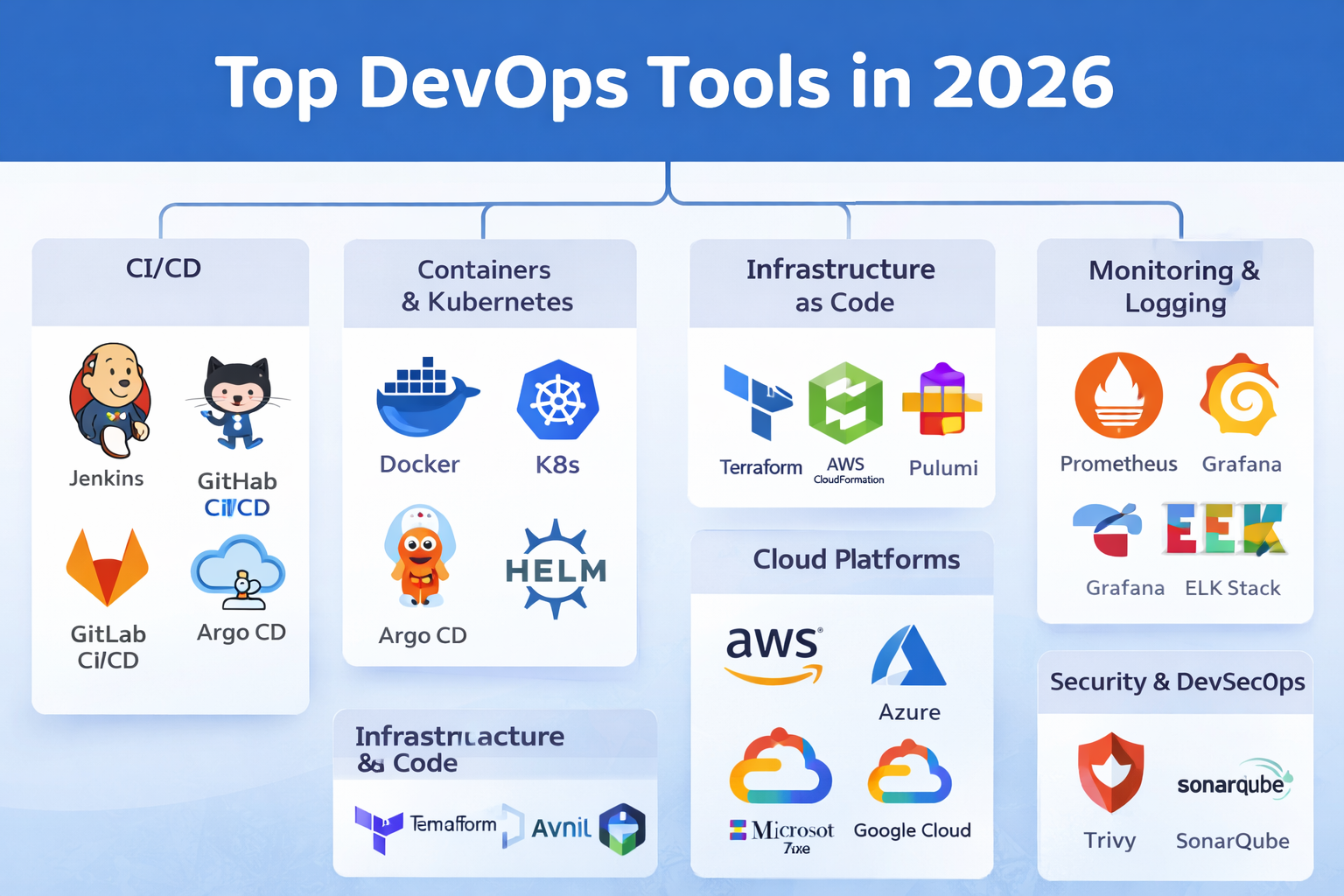
What I did: Took my final year project (that I’d already built) and:
- Dockerized it
- Added Docker Compose
- Set up CI/CD
- Deployed to AWS
- Wrote deployment docs
Why it worked: Showed I could apply DevOps to real applications.
Time: 2 days (app already existed)
Interview impact: Huge. “Tell me about your most complex project” became easy to answer.
Project 3: Infrastructure as Code
What I did: Used Terraform to create AWS resources (EC2, S3, security groups).
Why it worked: Showed I understood Infrastructure as Code. Could create/destroy entire environments with one command.
Time: 1 day
Real Talk Before You Go
You don’t need to know everything. You need to know enough to:
- Understand fundamentals
- Build a few projects
- Talk about them confidently
- Show you can learn
Companies will train you. They’re looking for people who can think, learn, and don’t give up.
Your GitHub matters more than you think. Start committing today.
Start before you feel ready. I wasted 4 months waiting to feel “ready.” Never felt ready. Applied anyway. Got rejected. Learned. Applied again. Got offers.
Take breaks. I burned out twice trying to study 8 hours daily. Not sustainable. 2 hours daily > 8 hours once a week.
You’re going to feel like an imposter. Everyone does. That feeling means you’re learning.
And hey, if a guy who ate instant noodles for 3 months straight and bombed 47 interviews can become a DevOps engineer…
You’ve got this.
Now stop reading and go build something.
If you found this helpful, commit something to GitHub today. Seriously. Even if it’s just a README. Future you will thank present you.
Feel free to DM me on LinkedIn if you’re stuck. I remember how lonely the learning journey felt. Happy to help.