
Last Updated: May 20 2026
I spent three years watching teams spin up CI/CD pipelines that looked great in demos and fell apart in production. Flaky tests nobody fixed. Security scans everyone ignored. Deploy scripts that only worked if you were connected to the right VPN on a Tuesday.
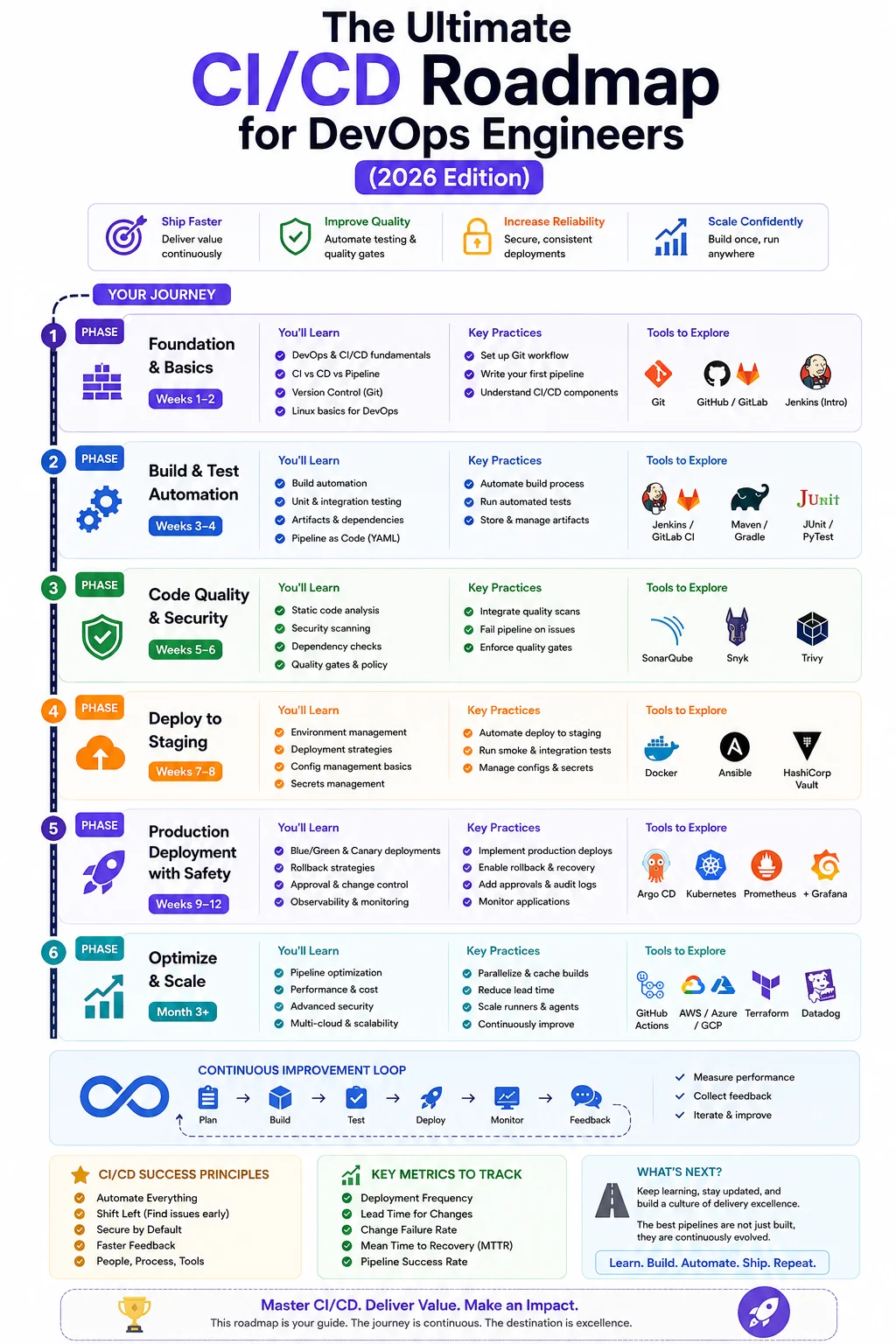
This guide Ultimate CI/CD Roadmap for devops documents what actually works — not the textbook version, but the real one that survives contact with real codebases, real teams, and real organizational complexity. Whether you’re a developer who just got handed “DevOps responsibilities,” or a seasoned engineer looking to audit your current setup, this roadmap gives you a clear, honest path forward.
1. What Exactly Is CI/CD? (And Why Most Teams Get It Wrong)

Let’s start with definitions — not the Wikipedia kind, the kind that actually clarifies what you’re building.
Continuous Integration (CI) is the practice of merging code changes into a shared repository frequently — ideally multiple times a day — with each merge triggering an automated build and test sequence. The goal isn’t speed for its own sake. The goal is early detection of integration problems. When eight developers merge at the end of the sprint, they’re basically doing batch integration, and that’s where the pain lives.
Continuous Delivery (CD) means your codebase is always in a deployable state. Every change that passes your pipeline can be released to production — but a human still clicks the button. This is different from Continuous Deployment, where that button click is also automated.
“CI/CD isn’t a tool you install. It’s a discipline you practice. The tool is just what enforces the discipline when everyone is tired and cutting corners.”— Kelsey Hightower, former Distinguished Engineer at Google
Here’s where teams go wrong: they install Jenkins or GitHub Actions, write a basic workflow that runs npm test, and call it CI/CD. That’s a good start, but it’s maybe 15% of the story. A mature pipeline covers build, test, security scanning, containerization, staging deployment, smoke testing, and monitored production rollout. Most pipelines I’ve audited cover two of those seven things reliably.
💡 Key Distinction
Continuous Delivery = your software can be deployed at any time, but a human decides when.
Continuous Deployment = every passing change is automatically deployed to production.
Most teams should target Delivery first, then evolve toward Deployment once they trust their test coverage.
2. The Non-Negotiable Foundations Before You Build Anything
Before you write a single pipeline YAML file, these five things need to be in place. Skip them and you’ll end up with a pipeline that technically runs but delivers no real confidence.
Version Control Discipline
Everything lives in Git. Not just application code — infrastructure, configuration, database migrations, even pipeline definitions. If it’s not in version control, it doesn’t meaningfully exist. Adopt a branching strategy like Trunk-Based Development or GitFlow and stick to it consistently across the team.
A Working Test Suite
CI without tests is just automation for automation’s sake. You need at least unit tests and a few integration tests before CI provides real value. Coverage percentage matters less than coverage of critical paths. I’ve seen 90% coverage codebases with zero tests on the payment flow. Don’t do that.
Reproducible Builds
If your build works on your laptop but fails in the pipeline — or works in the pipeline but not on another developer’s machine — you don’t have reproducible builds. Lock down dependency versions, containerize your build environment, and eliminate “it works on my machine” as a valid statement.
Environment Parity
Dev, staging, and production should be as similar as possible. Different database versions, OS flavors, or environment variables between environments are a constant source of “worked in staging, broke in prod” disasters. Docker and Kubernetes make this significantly easier.
Fast Feedback Loops
If your pipeline takes 45 minutes to run, developers will stop waiting for it. Target under 10 minutes for the CI phase. Parallelize tests, cache dependencies aggressively, and ruthlessly cut slow tests.
3. Understanding the 7 Stages of a Real CI/CD Pipeline
Here’s what a mature, production-grade CI/CD pipeline looks like end to end:

Stage 1 — Source: The Trigger Point
Every pipeline starts with a code event: a push to a branch, a pull request opened, or a merge to main. Your pipeline should define which events trigger which workflows. A push to a feature branch might only run unit tests; a merge to main runs the full pipeline.
Stage 2 — Build: Compile, Lint, and Validate
This stage compiles your application, runs the linter, and verifies the code actually builds. A failed build here is the cheapest possible failure — it costs seconds and catches problems before any tests run.
Stage 3 — Test: Unit, Integration, and End-to-End
Structure testing in layers. Unit tests run first (fastest, most isolated). Integration tests run next (they test service boundaries). End-to-end tests run last, usually only on main, because they’re slow and brittle. Keep them — but don’t let them block fast feedback.
Stage 4 — Security Scanning
SAST tools like Semgrep or SonarQube scan your source code for vulnerabilities. SCA tools like Snyk or Dependabot check your dependencies. Both should run in CI, and critical findings should fail the build. This is where most teams have a gap.
Stage 5 — Package and Containerize
This stage builds your Docker image, tags it with the git commit SHA and a semantic version, and pushes it to a container registry. This image is the immutable artifact that gets promoted through every environment. The exact same binary goes to staging and production.
Stage 6 — Deploy: Staging, Smoke Test, Then Production
Deployment is a multi-step process, not a single action. Deploy to staging first. Run smoke tests. Then promote to production using a deployment strategy — blue-green, canary, or rolling — that limits blast radius if something goes wrong.
Stage 7 — Monitor and Verify
The pipeline doesn’t end when the deployment succeeds. It ends when monitoring confirms the deployment is healthy. Set up automated post-deployment checks on error rate, latency, and key business metrics. If anything degrades, trigger automatic rollback.
4. Choosing Your Toolchain: A No-Hype Comparison
There’s no universally right answer. The best CI/CD tool is the one your team will actually use and maintain. Here’s a grounded look at the major options in 2025.
| Tool | Self-hosted? | K8s-native? | Free tier? | Learning curve | Best for |
|---|---|---|---|---|---|
| Jenkins | ✓ | ✗ | ✓ | High | Custom enterprise setups |
| GitHub Actions | Partial | ✗ | ✓ | Low | GitHub-hosted projects |
| GitLab CI | ✓ | ✓ | ✓ | Medium | Full DevOps platform |
| ArgoCD | ✓ | ✓ | ✓ | Medium | GitOps on Kubernetes |
| CircleCI | Partial | ✗ | Limited | Low–Medium | Startups and scale-ups |
✅ My Recommendation for 2025
If you’re starting fresh and your code is on GitHub, start with GitHub Actions. The learning curve is gentle, the free tier is generous, and the ecosystem of reusable workflows is enormous. Once you move to Kubernetes, add ArgoCD as the deployment layer. This combination handles 90% of use cases cleanly.
5. The Step-by-Step CI/CD Roadmap You Should Actually Follow

Here’s a phased roadmap that works consistently across teams of varying sizes and maturity. Don’t skip phases — each one builds on the last.
1
Phase 1 — Get the Basics Right (Weeks 1–2)
Set up Git with branch protection rules. Write at least 20 meaningful unit tests. Create a simple CI workflow that builds the project and runs tests on every pull request. Goal: no one merges broken code without knowing it.
Phase 2 — Containerize and Standardize (Weeks 3–4)
Write a Dockerfile for your application. Build and push the image in CI. Introduce a basic staging environment using Docker Compose or a small Kubernetes cluster. Developers should be able to run staging locally with a single command.
Phase 3 — Add Security and Quality Gates (Weeks 5–6)
Integrate SAST scanning (Semgrep is a solid free option). Add a dependency vulnerability scanner. Set code coverage minimums. Critical and high severity security findings should block merges.
Phase 4 — Automate Deployment to Staging (Weeks 7–8)
Every merge to main auto-deploys to staging. Add smoke tests that run post-deployment. If they fail, the pipeline alerts the team and rolls back automatically. Staging is always in sync with main.
Phase 5 — Production Deployment with Safeguards (Weeks 9–12)
Introduce a production deployment workflow with a manual approval gate. Set up deployment monitoring with automatic rollback on error rate spikes. Add distributed tracing. Once you trust the process, explore automated canary deployments.
Phase 6 — Optimize and Scale (Month 3+)
Audit pipeline speed. Cache aggressively. Parallelize test suites. Track DORA metrics. Run quarterly pipeline retrospectives. This phase never really ends — and that’s perfectly fine.
6. Hands-On: Your First GitHub Actions Workflow
Enough theory. Here’s a real, annotated GitHub Actions workflow for a Node.js application — production-usable, every decision explained.
# .github/workflows/ci-cd.yml

name: CI/CD Pipeline

# Triggers: run on all PRs and pushes to main
on:
  push:
    branches: [main, develop]
  pull_request:
    branches: [main]

env:
  NODE_VERSION: '20'
  REGISTRY: ghcr.io
  IMAGE_NAME: ${{ github.repository }}

jobs:

  # ── Job 1: Lint and Test ────────────────────────────────
  test:
    name: Lint, Test & Coverage
    runs-on: ubuntu-latest
    steps:
      - name: Checkout code
        uses: actions/checkout@v4

      - name: Setup Node.js
        uses: actions/setup-node@v4
        with:
          node-version: ${{ env.NODE_VERSION }}
          cache: 'npm'

      - name: Install dependencies
        run: npm ci   # Always npm ci in CI — never npm install

      - name: Run linter
        run: npm run lint

      - name: Run unit tests with coverage
        run: npm run test:coverage

      - name: Upload coverage report
        uses: codecov/codecov-action@v4
        with:
          token: ${{ secrets.CODECOV_TOKEN }}
          fail_ci_if_error: true

  # ── Job 2: Security Scanning ────────────────────────────
  security:
    name: Security Scan
    runs-on: ubuntu-latest
    needs: test
    steps:
      - uses: actions/checkout@v4
      - name: Run Snyk dependency scan
        uses: snyk/actions/node@master
        env:
          SNYK_TOKEN: ${{ secrets.SNYK_TOKEN }}
        with:
          args: --severity-threshold=high

  # ── Job 3: Build & Push Docker Image ────────────────────
  build:
    name: Build Container Image
    runs-on: ubuntu-latest
    needs: [test, security]
    permissions:
      contents: read
      packages: write
    outputs:
      image_tag: ${{ steps.meta.outputs.tags }}
    steps:
      - uses: actions/checkout@v4

      - name: Log in to Container Registry
        uses: docker/login-action@v3
        with:
          registry: ${{ env.REGISTRY }}
          username: ${{ github.actor }}
          password: ${{ secrets.GITHUB_TOKEN }}

      - name: Extract metadata
        id: meta
        uses: docker/metadata-action@v5
        with:
          images: ${{ env.REGISTRY }}/${{ env.IMAGE_NAME }}
          tags: |
            type=sha,prefix=sha-
            type=semver,pattern={{version}}

      - name: Build and push image
        uses: docker/build-push-action@v5
        with:
          context: .
          push: ${{ github.ref == 'refs/heads/main' }}
          tags: ${{ steps.meta.outputs.tags }}
          cache-from: type=gha
          cache-to: type=gha,mode=max

  # ── Job 4: Deploy to Staging ────────────────────────────
  deploy-staging:
    name: Deploy to Staging
    runs-on: ubuntu-latest
    needs: build
    if: github.ref == 'refs/heads/main'
    environment: staging
    steps:
      - name: Deploy to staging
        run: echo "Deploying ${{ needs.build.outputs.image_tag }} to staging"
      - name: Run smoke tests
        run: npm run test:smoke -- --env=staging
⚠️ Common Mistake
Never use npm install in CI pipelines. Always use npm ci instead. The ci command does a clean, deterministic install from the lockfile. Using npm install can silently update dependencies and cause inconsistent, hard-to-diagnose failures across environments.
7. Shifting Security Left — DevSecOps in Your Pipeline
“Shifting left” means moving security earlier in development — closer to where code is written, not bolted on as an afterthought before deployment. In CI/CD terms, this means security checks run in every pipeline run, not in quarterly audits.
What to Scan and When
Three categories every mature pipeline should cover:
- SAST (Static Application Security Testing) — scans your source code for vulnerabilities without executing it. Tools: Semgrep, SonarQube, CodeQL.
- SCA (Software Composition Analysis) — checks your dependencies against known vulnerability databases. Tools: Snyk, Dependabot, OWASP Dependency-Check.
- Container Scanning — checks Docker images for OS-level vulnerabilities. Tool: Trivy (open-source, fast, highly recommended).
Managing Noise Without Ignoring Real Issues
The biggest challenge isn’t adding security tools — it’s managing alert fatigue. Use a tiered approach: critical and high severity findings block the build; medium severity is reported but doesn’t block; low severity is logged weekly for review. Triage your ignored findings quarterly.
Secrets Management
Hard-coded secrets are one of the most common and most preventable vulnerabilities. Use gitleaks or truffleHog in CI to catch accidentally committed secrets. Store all runtime secrets in a dedicated vault — HashiCorp Vault, AWS Secrets Manager, or your cloud provider’s equivalent. Never bake secrets into Docker images.
✅ Free Security Stack
Semgrep (SAST) + Trivy (container scanning) + GitHub Dependabot (SCA) — together these cover the essentials at zero licensing cost. A solid starting point for any team.
8. Observability and Monitoring for CI/CD

A deployment that “succeeds” in the pipeline but causes a 500% spike in error rates is not a successful deployment. Your pipeline isn’t complete until it can observe what it just deployed.
Pipeline-Level Metrics: The DORA Four
The DORA (DevOps Research and Assessment) metrics are the industry standard for measuring pipeline health:
- Deployment Frequency — how often do you deploy to production?
- Lead Time for Changes — how long from commit to production?
- Mean Time to Recovery (MTTR) — how fast do you recover from failures?
- Change Failure Rate — what percentage of deployments cause incidents?
Elite teams deploy on-demand multiple times per day, have lead times under one hour, recover in under one hour, and maintain a change failure rate below 5%. These four numbers tell you more than any dashboard.
Application-Level Observability Post-Deploy
After every production deployment, your monitoring stack should watch for anomalies in error rates, P95/P99 latency, and key business metrics. If anything degrades beyond a threshold within 15 minutes of a deploy, treat it as a deployment-correlated incident and trigger rollback.
Modern observability stacks use three pillars: Metrics (Prometheus + Grafana or Datadog), Logs (ELK Stack or Grafana Loki), and Traces (Jaeger, Tempo, or Honeycomb). Start with metrics and logs — add tracing once you have distributed services that are hard to debug.
9. The 6 Mistakes That Silently Wreck CI/CD Pipelines
These are the issues I see most often — and they’re almost always the result of reasonable decisions made at the wrong time.
1. Ignoring Flaky Tests
A flaky test is one that sometimes passes and sometimes fails with no code change. Teams often just re-run the pipeline, which creates the worst habit in CI/CD culture: assuming a failed pipeline is “probably fine.” Quarantine flaky tests immediately. Fix or delete them within a sprint. Zero tolerance for flakiness isn’t perfectionism — it’s what keeps CI trustworthy.
2. Treating the Pipeline as a One-Time Setup
Pipelines need maintenance like code does. New services, new deployment targets, new tooling — if your pipeline was set up two years ago and hasn’t been touched since, it’s almost certainly bottlenecking your team in ways nobody has diagnosed yet.
3. Not Enforcing Branch Protection
The most sophisticated pipeline is useless if developers can push directly to main and bypass it. Enable branch protection. Require CI to pass and at least one approving review before any merge. This is non-negotiable.
4. Slow Pipelines with No Optimization
A 30-minute pipeline will be circumvented — people will merge without waiting. Target under 10 minutes for the main CI pass. Parallelize tests. Cache Docker layers and dependency downloads. Profile your slowest jobs and attack the biggest bottleneck first.
5. No Automated Rollback Strategy
Most teams have a rollback plan: “we’ll redeploy the previous version.” Few have automated rollback. If your error rate spikes after a deploy and nothing triggers automatically, you’re relying on someone noticing and acting fast — often at 2am. Automate the obvious triggers.
6. Treating CD as Optional
Many teams implement CI well but treat the delivery side as an afterthought. Production deployments remain manual, infrequent, and stressful. The delivery side is where the real business value lives. Automating it is scary. Do it anyway — just start with staging and build confidence from there.
10. Frequently Asked Questions
What is CI/CD in DevOps and why does it matter?
CI/CD stands for Continuous Integration and Continuous Delivery. It automates building, testing, and deploying code changes so software moves from a developer’s machine to production quickly and reliably. It matters because it reduces release risk, removes most manual deployment effort, and catches bugs early — when they’re far cheaper to fix.
What’s the difference between Continuous Delivery and Continuous Deployment?
Continuous Delivery means your software is always ready to deploy, but a human decides when. Continuous Deployment automatically deploys every change that passes the pipeline with no human approval step. Most teams should master Delivery before attempting Deployment.
Which CI/CD tool is best for beginners in 2025?
GitHub Actions is the most beginner-friendly option. It has a gentle learning curve, excellent documentation, a huge ecosystem of pre-built actions, and a generous free tier. If your code is on GitHub, it’s the clear starting point. Jenkins is powerful but requires significantly more operational knowledge to run well.
How long does it take to learn CI/CD from scratch?
Someone with basic Git and programming knowledge can write a functioning CI workflow in a few days. Building production-grade pipelines with security, automated deployment, and monitoring comfortably takes 3–6 months of hands-on work. The concepts are straightforward; depth comes from dealing with real-world complexity over time.
What are DORA metrics and why should I track them?
DORA metrics are four measurements that strongly correlate with high-performing software teams: Deployment Frequency, Lead Time for Changes, Mean Time to Recovery, and Change Failure Rate. Tracking them gives you an objective, data-driven view of pipeline performance and tells you exactly where to focus improvement efforts.
Do I need Kubernetes to have a good CI/CD pipeline?
No. Many teams run excellent CI/CD pipelines deploying to plain VMs, Heroku, Render, or AWS ECS. Start with what your team can operate confidently. Migrate to Kubernetes when you have genuine need for its features — not because it sounds impressive on a résumé.
Additional Resources
- What is CI/CD – Understanding the basics of CI/CD
- DevOps – A detailed blog posts related to devops technologies
Wrapping Up
Building a great CI/CD pipeline is one of the highest-leverage investments an engineering team can make. Done well, it removes the fear from deployments, catches problems before users do, and compounds your team’s velocity over time.
The roadmap in this article is intentionally phased. You don’t need to implement everything at once. Start with the basics — a working test suite and a simple CI workflow — and build from there. Each phase makes the next one possible.
The teams I’ve seen succeed at CI/CD share one trait: they treat the pipeline as a product, not an afterthought. They measure it, maintain it, and improve it on a regular cadence. That mindset, more than any specific tool choice, is what separates good pipelines from great ones.
Start small, move fast, break less.
KEDAR SALUNKHE
Senior DevOps Engineer · DevOps Weekly
I have spent eight years building and breaking CI/CD pipelines at companies ranging from Series B startups to Fortune 500s. I have contributed to several open-source DevOps tools and writes about engineering culture, platform engineering, and why a well-maintained pipeline is the best gift you can give your future self.