
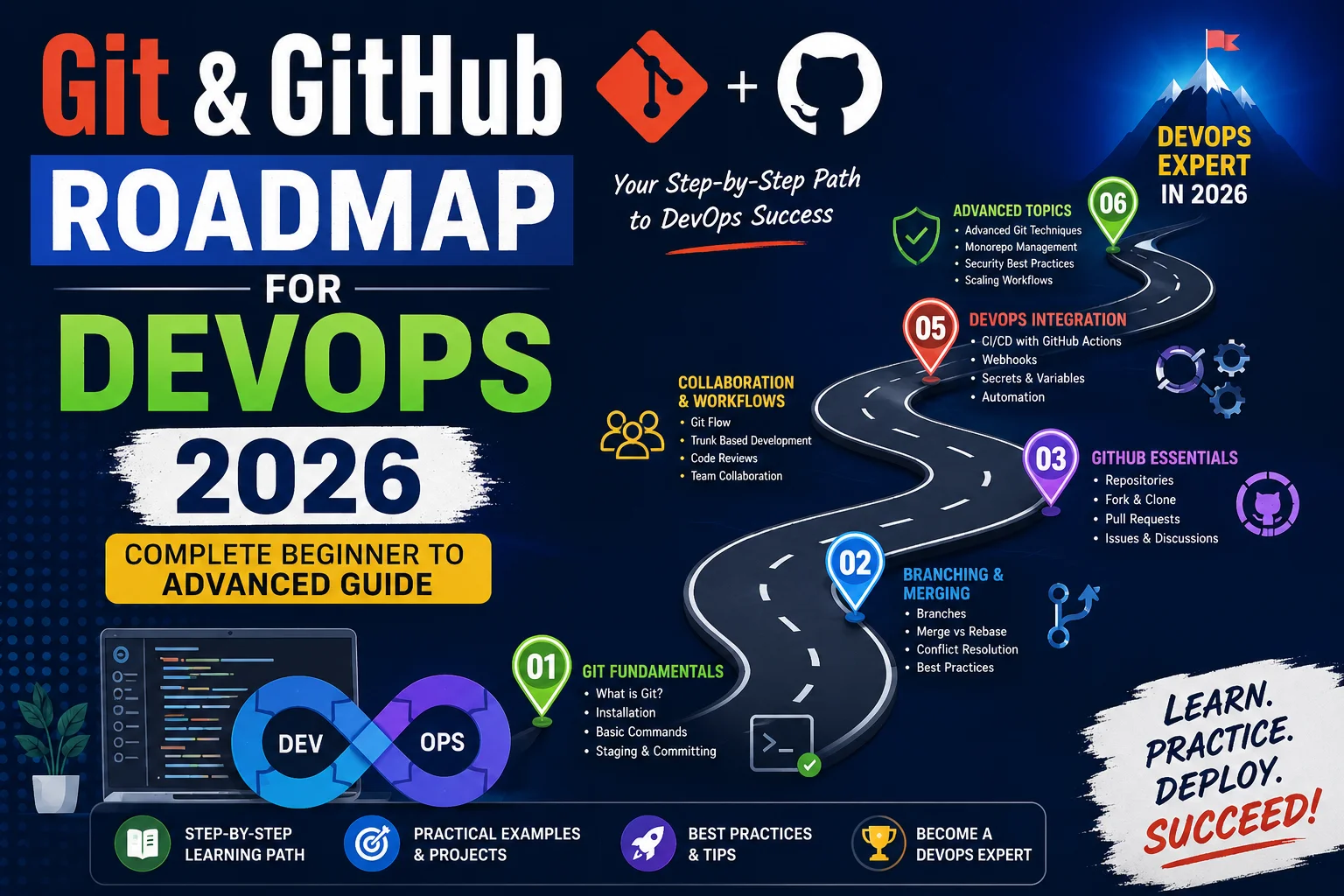
Updated for 2026 — Covering Git 2.x, GitHub Actions, GitOps & More
Everything you need to go from your first git init to shipping production-grade GitOps workflows.
Table of Contents
If there is one skill that every DevOps engineer — regardless of their specialisation — must have in their toolkit, it is Git. And in 2026, that statement has never been truer. Whether you are deploying Kubernetes clusters, building automated pipelines, or managing infrastructure as code, every workflow eventually leads back to a git push.
This guide Git & GitHub Roadmap for DevOps 2026 is designed to take you on a structured journey. Not a cherry-picked list of commands you can Google in five seconds, but a deliberate, milestone-driven roadmap that mirrors how real DevOps teams operate at companies like Google, Netflix, and Amazon. Whether you are a complete beginner who has never touched a terminal or a mid-level engineer looking to level up into GitOps and advanced automation, this roadmap has a stage for you.
✅ Pro Tip: Bookmark this page. You will want to return to specific stages as you progress through your DevOps journey. Each section builds on the previous one.
Why Git is the Backbone of DevOps

DevOps is fundamentally about speed, collaboration, and reliability. Git is the technology that makes all three possible simultaneously. Let us understand why it is non-negotiable in 2026:
- Single Source of Truth: Your entire codebase, infrastructure definitions, and configuration live in one version-controlled repository.
- Audit Trail: Every change is logged with who made it, when, and why — critical for compliance and incident response.
- Parallel Development: Teams can work on dozens of features simultaneously without stepping on each other’s work.
- Rollback on Demand: When something breaks in production,
git revertis your fastest path to safety. - GitOps Enablement: Modern platforms like Argo CD and Flux CD treat Git as the desired-state store for entire Kubernetes clusters.
“In DevOps, Git is not a tool — it is the operating model. Everything flows through it.”
Roadmap Overview (2026)

Before diving deep, here is the bird’s-eye view of the complete roadmap. Think of this as seven progressive stages, each building naturally on the last:
Stage 01
Git Fundamentals
Installation, core concepts, basic commands, and understanding the three-tree architecture.
Stage 02
Branching Strategies
Git Flow, trunk-based development, feature flags, and merge vs rebase debates.
Stage 03
GitHub Essentials
Repositories, Issues, Projects, GitHub CLI, and navigating the GitHub ecosystem.
Stage 04
Collaboration & PRs
Pull request workflows, code review best practices, and team conventions.
Stage 05
GitHub Actions & CI/CD
Automating builds, tests, and deployments with GitHub’s native workflow engine.
Stage 06
Security & Compliance
Branch protection, secret scanning, Dependabot, CODEOWNERS, and signing commits.
Stage 07
GitOps & Advanced
Argo CD, Flux, multi-repo strategies, monorepos, and enterprise-grade Git workflows.
Stage 1: Git Fundamentals — Where Every Journey Begins
Do not skip this stage, even if you think you already know Git. Most engineers have gaps here that cause real pain later. Let us build the foundation properly.
Installing and Configuring Git
Start with a clean installation and configure your identity. Every commit you make will carry this information:
# Install Git (Ubuntu/Debian)
sudo apt update && sudo apt install git -y

# Install Git (macOS with Homebrew)
brew install git

# Set global identity
git config --global user.name "Your Name"
git config --global user.email "you@example.com"

# Set default branch name (2026 standard)
git config --global init.defaultBranch main

# Enable colour output
git config --global color.ui auto

# Verify configuration
git config --list
Understanding Git’s Three-Tree Architecture
This is where most tutorials fail beginners. Git manages three distinct areas that you must always keep in mind:
| Area | Also Known As | What It Holds |
|---|---|---|
| Working Directory | Working Tree | Your actual files on disk — what you see in your editor |
| Staging Area | Index / Cache | Changes you have marked with git add, ready to commit |
| Repository | .git directory | The full history of all committed snapshots |
Essential Daily Commands
git init— Initialise a new local repositorygit clone <url>— Copy a remote repository locallygit status— See what has changed since the last commitgit add ./git add <file>— Stage changes for the next commitgit commit -m "message"— Save a snapshot with a descriptive messagegit log --oneline --graph— Visualise your commit historygit diff— See exactly what changed line by linegit stash— Temporarily shelve changes to switch context
Writing Good Commit Messages (Conventional Commits)
In 2026, adopting Conventional Commits is the professional standard. This format enables automated changelogs, semantic versioning, and better team communication:
# Format: <type>(scope): <short description>

feat(auth): add OAuth2 support for GitHub login
fix(pipeline): resolve race condition in parallel builds
docs(readme): update installation instructions for v3
chore(deps): bump actions/checkout from 3 to 4
refactor(cache): replace Redis with Valkey for caching layer
⚠️ Common Mistake: Never commit directly to main or master in team environments. Always work on feature branches. We cover the right strategy in Stage 2.
Stage 2: Branching Strategies — How Teams Stay Sane
Branching is where individual Git knowledge becomes team-level discipline. The strategy your team chooses directly impacts how fast you can ship and how stable your production environment is.
Git Flow — The Classic Approach
Git Flow uses two permanent branches (main and develop) plus short-lived feature, release, and hotfix branches. It is well-suited for teams that have scheduled release cycles:
# Start a new feature
git checkout develop
git checkout -b feature/user-authentication

# Work on your feature, then merge back
git checkout develop
git merge --no-ff feature/user-authentication
git branch -d feature/user-authentication

# Create a release
git checkout -b release/2.1.0
# Final testing, bump version numbers
git checkout main && git merge --no-ff release/2.1.0
git tag -a v2.1.0 -m "Release version 2.1.0"
Trunk-Based Development — The 2026 Default
Modern DevOps teams — especially those practising continuous deployment — prefer Trunk-Based Development (TBD). Developers integrate small changes into main multiple times per day, keeping the branch short-lived (usually under 24 hours):
- All developers commit to a single shared trunk (
main) - Feature branches exist for at most 1–2 days
- Feature flags control which features are visible in production
- Requires a solid CI/CD pipeline and comprehensive test suite
- Used by Google, Facebook, and most high-velocity engineering teams
Merge vs Rebase — The Eternal Debate
| Aspect | git merge | git rebase |
|---|---|---|
| History | Preserves full branch history with merge commits | Creates a linear, cleaner history |
| Safety | Safe on shared/public branches | Never rebase public branches others depend on |
| Use Case | Integrating completed features | Cleaning up local commits before a PR |
| Conflict Resolution | Resolve once at merge time | Resolve at each commit being replayed |
🚫 Golden Rule: Never use git rebase on branches that other developers have already pulled. You will rewrite shared history and cause painful conflicts for your teammates.
Stage 3: GitHub Essentials — Your Remote Collaboration Hub
GitHub is far more than a place to store code. In 2026, it is a complete DevOps platform with project management, CI/CD, security scanning, package registries, and infrastructure management built in.
Setting Up SSH Authentication
# Generate a new SSH key (use Ed25519 — it's faster and more secure than RSA)
ssh-keygen -t ed25519 -C "you@example.com"

# Start the SSH agent and add your key
eval "$(ssh-agent -s)"
ssh-add ~/.ssh/id_ed25519

# Copy public key to clipboard (macOS)
pbcopy < ~/.ssh/id_ed25519.pub

# Test your GitHub connection
ssh -T git@github.com
# Expected: "Hi username! You've successfully authenticated..."
GitHub CLI — Work Without Leaving Your Terminal
The GitHub CLI (gh) is a game-changer for DevOps workflows. Install it once and you will wonder how you ever lived without it:
# Install GitHub CLI
brew install gh          # macOS
sudo apt install gh      # Ubuntu

# Authenticate
gh auth login

# Create a repository
gh repo create my-app --public --clone

# Create a pull request
gh pr create --title "feat: add Dockerfile" --body "Containerises the app"

# View CI/CD run status
gh run list
gh run watch

# Create a release
gh release create v1.0.0 --title "v1.0.0" --notes "Initial release"
Stage 4: Collaboration & Pull Requests — Where Code Quality Lives
Pull Requests (PRs) are the heartbeat of collaborative development. A well-run PR process is the difference between a high-functioning team and a chaotic one.
The Anatomy of a Great Pull Request
- Focused and Small: A PR should do one thing. Reviewers lose focus after 400 lines of changed code.
- Self-Describing Title: Use Conventional Commits format in the PR title — your changelog will thank you.
- Detailed Description: Include what changed, why it changed, how to test it, and any screenshots.
- Linked Issues: Use
Closes #123in the description to auto-close related issues on merge. - Draft PRs for WIP: Open a draft PR early to signal work in progress and gather early feedback.
CODEOWNERS — Automating Review Assignments
# .github/CODEOWNERS

# Global owners — review everything by default
*                     @org/platform-team

# Infrastructure changes require DevOps team approval
/infra/               @org/devops-team
/terraform/           @org/devops-team

# Frontend changes
/src/frontend/        @org/frontend-team

# Security-sensitive files require security team review
/auth/                @org/security-team
*.pem                 @org/security-team
Stage 5: GitHub Actions & CI/CD — Automate Everything
This is where DevOps begins to shine. GitHub Actions is the native CI/CD platform built directly into GitHub. It is event-driven, highly composable, and deeply integrated with your repository.
Understanding GitHub Actions Architecture
- Workflow: A YAML file in
.github/workflows/that defines automation - Event: The trigger — a push, PR, schedule, or manual dispatch
- Job: A group of steps that runs on the same runner machine
- Step: An individual task — run a command or use a pre-built Action
- Runner: The virtual machine (GitHub-hosted or self-hosted) that executes jobs
A Production-Grade CI/CD Pipeline
# .github/workflows/ci-cd.yml
name: CI/CD Pipeline

on:
  push:
    branches: [main]
  pull_request:
    branches: [main]

env:
  REGISTRY: ghcr.io
  IMAGE_NAME: ${{ github.repository }}

jobs:
  # ── Job 1: Lint and Test ──────────────────────────────
  test:
    name: Lint & Test
    runs-on: ubuntu-latest
    steps:
      - uses: actions/checkout@v4

      - name: Setup Node.js
        uses: actions/setup-node@v4
        with:
          node-version: '20'
          cache: 'npm'

      - name: Install dependencies
        run: npm ci

      - name: Run linter
        run: npm run lint

      - name: Run unit tests
        run: npm test -- --coverage

      - name: Upload coverage
        uses: codecov/codecov-action@v4

  # ── Job 2: Build Docker Image ─────────────────────────
  build:
    name: Build & Push Image
    runs-on: ubuntu-latest
    needs: test
    if: github.ref == 'refs/heads/main'
    permissions:
      contents: read
      packages: write
    steps:
      - uses: actions/checkout@v4

      - name: Log in to GHCR
        uses: docker/login-action@v3
        with:
          registry: ${{ env.REGISTRY }}
          username: ${{ github.actor }}
          password: ${{ secrets.GITHUB_TOKEN }}

      - name: Build and push Docker image
        uses: docker/build-push-action@v5
        with:
          context: .
          push: true
          tags: ${{ env.REGISTRY }}/${{ env.IMAGE_NAME }}:latest

  # ── Job 3: Deploy to Staging ─────────────────────────
  deploy-staging:
    name: Deploy to Staging
    runs-on: ubuntu-latest
    needs: build
    environment: staging
    steps:
      - name: Deploy via SSH
        uses: appleboy/ssh-action@v1
        with:
          host: ${{ secrets.STAGING_HOST }}
          username: deploy
          key: ${{ secrets.STAGING_SSH_KEY }}
          script: |
            docker pull ${{ env.REGISTRY }}/${{ env.IMAGE_NAME }}:latest
            docker compose -f /opt/app/docker-compose.yml up -d
💡 Did You Know? GitHub Actions now supports GPU runners for ML workloads, ARM64 runners for Apple Silicon-native builds, and larger runners with up to 64 cores for performance-intensive CI jobs in 2026.
Stage 6: Security & Compliance — Hardening Your Git Workflows
Security in Git is not optional — it is a professional responsibility. In 2026, with supply chain attacks on the rise, every DevOps engineer must understand how to protect their repositories and pipelines.
Branch Protection Rules — Non-Negotiable for Production
Configure these protections on your main branch immediately:
- Require pull request reviews before merging (minimum 1–2 approvals)
- Require status checks to pass before merging (CI must be green)
- Require branches to be up to date before merging
- Require signed commits (GPG or SSH commit signing)
- Restrict who can push directly to the branch
- Enable branch deletion protection for
main
Secret Management — Never Commit Secrets
# If you accidentally committed a secret, act immediately:

# 1. Revoke the secret in the service that issued it (do this FIRST)
# 2. Remove from history using git-filter-repo (preferred over BFG)
pip install git-filter-repo

git filter-repo --path config/secrets.json --invert-paths

# 3. Force push the cleaned history
git push origin --force --all

# 4. Ask all team members to re-clone the repository

# Prevention: use pre-commit hooks with gitleaks
brew install gitleaks
gitleaks protect --staged -v
Signing Commits with SSH (2026 Standard)
# Configure Git to sign commits with your SSH key
git config --global gpg.format ssh
git config --global user.signingkey ~/.ssh/id_ed25519.pub
git config --global commit.gpgsign true

# Now all your commits are cryptographically verified
git commit -m "feat: add new feature"
# Shows "Verified" badge on GitHub
Stage 7: GitOps & Advanced Workflows — The Frontier
GitOps is the pinnacle of this roadmap. It is the practice of using Git as the single source of truth for declarative infrastructure and application state. If it is not in Git, it does not exist in production.
The Four Core GitOps Principles
Principle 01
Declarative Configuration
The entire system (infrastructure + applications) is described declaratively. Kubernetes manifests, Terraform, Helm charts — everything in YAML or HCL.
Principle 02
Versioned and Immutable State
The desired system state is versioned in Git. Previous states are canonical and can be rolled back to at any time with a simple git revert.
Principle 03
Automatically Pulled
Software agents (Argo CD, Flux) automatically pull the desired state from Git and apply it to the cluster. No human needs to run kubectl apply manually.
Principle 04
Continuously Reconciled
The agents continuously compare actual vs desired state and self-heal any drift. If someone manually changes a setting in the cluster, it gets reverted automatically.
Argo CD GitOps Setup
# argocd-app.yaml — Deploy an application with Argo CD
apiVersion: argoproj.io/v1alpha1
kind: Application
metadata:
  name: my-production-app
  namespace: argocd
spec:
  project: default

  source:
    repoURL: https://github.com/myorg/k8s-manifests.git
    targetRevision: main
    path: apps/production/my-app

  destination:
    server: https://kubernetes.default.svc
    namespace: production

  syncPolicy:
    automated:
      prune: true       # Remove resources deleted from Git
      selfHeal: true    # Revert manual cluster changes
    syncOptions:
      - CreateNamespace=true
      - PrunePropagationPolicy=foreground
Monorepo vs Multi-Repo Strategy
| Factor | Monorepo | Multi-Repo |
|---|---|---|
| Code Sharing | ✅ Trivial — shared libraries are first-class | ❌ Requires package management overhead |
| Team Autonomy | ❌ Coordination overhead increases at scale | ✅ Teams own their repositories independently |
| CI/CD Complexity | Needs smart affected-path detection (Nx, Turborepo) | Simpler per-repo pipelines |
| Access Control | Harder to restrict at service level | Granular per-repo permissions |
| Used By | Google, Meta, Microsoft, Uber | Netflix, Amazon, most startups |
Essential Tools & Ecosystem for 2026
Round out your Git and GitHub expertise with these tools that professional DevOps teams rely on:
Version Control CI/CD GitOps Security
| Tool | Category | Purpose |
|---|---|---|
| Git | Version Control | Distributed version control — the foundation |
| GitHub CLI (gh) | Version Control | Manage GitHub from your terminal |
| GitHub Actions | CI/CD | Native workflow automation on GitHub |
| Argo CD | GitOps | Kubernetes-native GitOps continuous delivery |
| Flux CD | GitOps | CNCF GitOps toolkit for Kubernetes |
| Gitleaks | Security | Secret detection in repositories |
| Dependabot | Security | Automated dependency vulnerability patching |
| pre-commit | Security | Git hooks for quality gates before every commit |
| Semantic Release | CI/CD | Automated versioning from Conventional Commits |
| Nx / Turborepo | CI/CD | Intelligent build orchestration for monorepos |
Frequently Asked Questions
Is Git the same as GitHub?
No. Git is the open-source distributed version control system developed by Linus Torvalds. GitHub is a cloud-based hosting platform for Git repositories, owned by Microsoft. GitHub adds collaboration features, project management, CI/CD, and security tooling on top of Git. Other Git hosts include GitLab, Bitbucket, and self-hosted options like Gitea.
Should I learn Git Flow or Trunk-Based Development in 2026?
Learn both, but default to Trunk-Based Development. TBD is what high-velocity teams like Google and Shopify use, and it pairs naturally with modern CI/CD pipelines. Git Flow is still valuable for teams with strict release cycles or complex versioning requirements (e.g., maintaining multiple major versions simultaneously).
How long does it take to go through this entire roadmap?
With consistent daily practice, you can reach a solid intermediate level (Stages 1–4) in 4–6 weeks. Becoming proficient with GitHub Actions and GitOps (Stages 5–7) typically takes 3–6 months of real-world project work. The key is hands-on practice — set up real repositories, automate real workflows, and break things intentionally so you understand how to fix them.
What is the best way to practise Git without a real project?
Clone open-source projects on GitHub and contribute to them. Start by fixing documentation, then tackle good-first-issue labelled bugs. This gives you real experience with forks, PRs, code reviews, and CI/CD pipelines in a genuine team environment.
How important is GitHub Actions vs Jenkins in 2026?
GitHub Actions has become the dominant choice for teams already on GitHub, offering zero-infrastructure overhead and deep platform integration. Jenkins still holds ground in enterprises with legacy infrastructure or complex on-premise requirements. However, for greenfield DevOps projects in 2026, GitHub Actions is the strong default recommendation.
Final Thoughts: Your Git & GitHub Journey Starts Now
The roadmap we have covered in this guide represents the real-world progression of a DevOps engineer’s relationship with Git and GitHub — from the nervous first git commit to orchestrating infrastructure deployments across Kubernetes clusters through GitOps principles.
The most important thing I can tell you after eight years in this field is this: do not rush the fundamentals. Developers who truly understand Git’s three-tree architecture, how rebasing works under the hood, and why commit hygiene matters — these are the engineers who debug merge nightmares in minutes while others spend hours. The fundamentals multiply your effectiveness at every advanced stage.
Here is your immediate action plan to put this roadmap into motion:
- Spend one week on Stage 1 — practise every command until it is muscle memory
- Create a personal project repository and apply a proper branching strategy
- Set up your first GitHub Actions workflow (even a simple “Hello World” pipeline counts)
- Join the GitHub community — contribute to one open-source project this month
- Set up Argo CD on a local Minikube cluster and deploy your first GitOps application
✅ Share This Roadmap: If this guide helped you, share it with a colleague or bookmark it for your team’s onboarding. The best way to cement your own learning is to teach it to someone else.
Additional Resources
- Learn Git Branching – Interested in learning Git? Well you’ve come to the right place! “Learn Git Branching” is the most visual and interactive way to learn Git on the web; you’ll be challenged with exciting levels
- Git Blogs – Collection of git related learning blogs.
About the Author
Kedar Salunkhe
Senior Cloud & DevOps Engineer · 8+ Years Experience
Kedar specialises in cloud infrastructure, Kubernetes, and DevOps automation across AWS, GCP, and Azure. He has helped engineering teams at startups and enterprises adopt GitOps, CI/CD best practices, and platform engineering principles at scale.
Git & GitHub Roadmap for DevOps 2026 · Written by Kedar Salunkhe · Published June 3, 2026