
Last Updated: June 6 2026
If you are serious about building a career in cloud infrastructure and automation, there is no better combination than AWS and DevOps. Amazon Web Services holds roughly 31% of the global cloud market, and organisations worldwide are desperately looking for engineers who can bridge the gap between development and operations on AWS. But knowing where to start — and what to learn next — is genuinely overwhelming.
I have been working in cloud and DevOps for eight years, and I have watched countless engineers spin their wheels trying to learn everything at once. This guide cuts through the noise. It gives you a clear, opinionated roadmap that takes you from zero AWS knowledge to a job-ready, production-grade DevOps engineer — organised in five phases, each building on the last.
📌 Who Is This Guide For?
This aws devops roadmap 2026 is written for developers and sysadmins who want to transition into DevOps roles, junior DevOps engineers looking to specialise in AWS, and self-taught practitioners who want a structured learning path. Some comfort with Linux and basic scripting is assumed.
Table of Contents
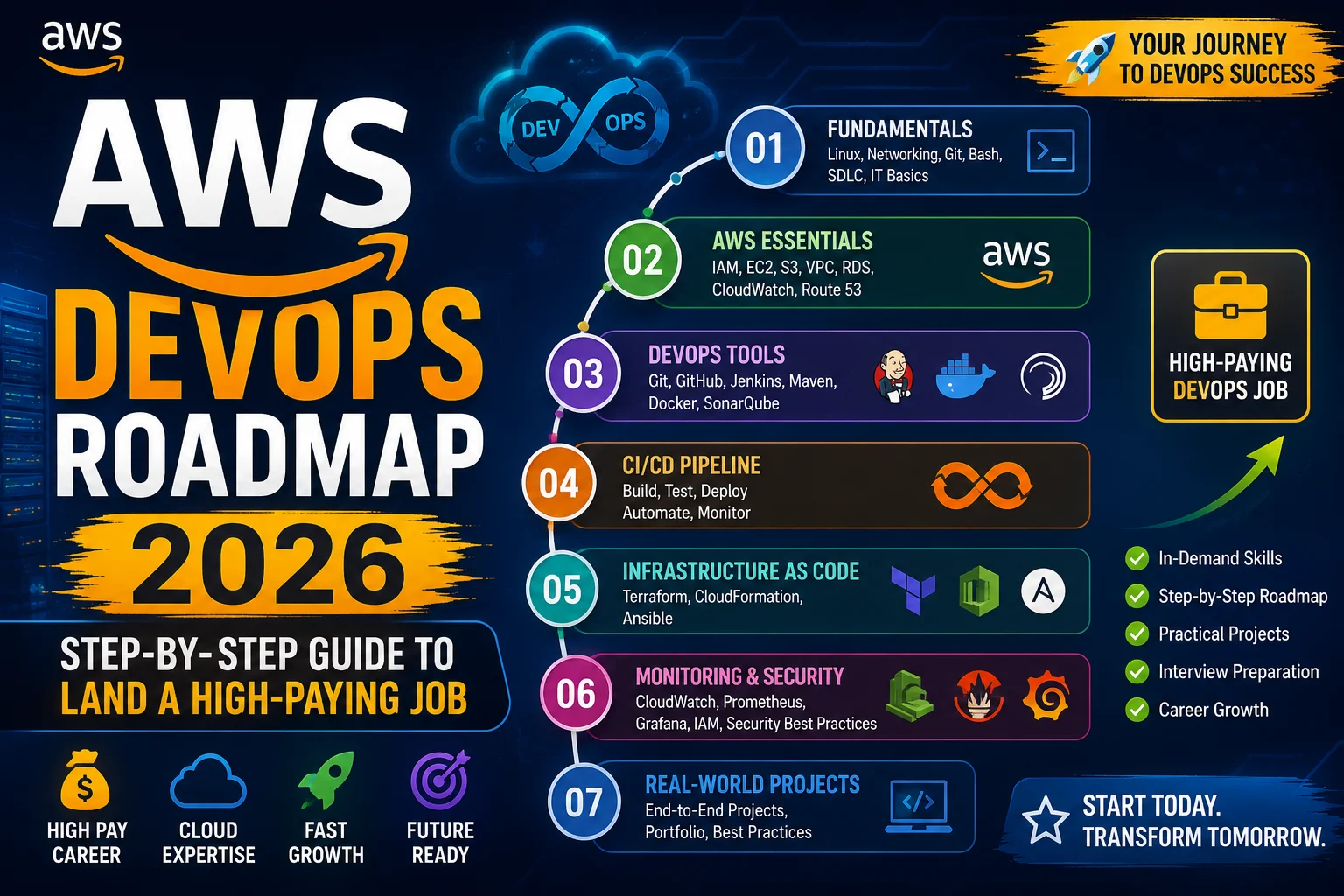
🗺️ The Five-Phase AWS DevOps Roadmap

Learning AWS for DevOps is not about memorising every service. It is about building a mental model of how modern cloud systems are architected, automated, and operated. These five phases represent the natural progression I have seen in every successful engineer’s journey.
| Phase | Focus Area | Key Skills |
|---|---|---|
| Phase 1 | Core AWS Foundations | IAM, VPC, EC2, S3, RDS, AWS CLI |
| Phase 2 | Infrastructure as Code | CloudFormation, CDK, Terraform, Ansible |
| Phase 3 | CI/CD Pipelines | CodePipeline, CodeBuild, CodeDeploy, GitHub Actions |
| Phase 4 | Containers & Orchestration | Docker, ECR, ECS, EKS, Fargate |
| Phase 5 | Observability & Security | CloudWatch, X-Ray, GuardDuty, Cost Optimisation |
🏗️ Phase 1: Core AWS Foundations

Every skyscraper needs a solid foundation. Before you deploy a single CI/CD pipeline or write a line of Terraform, you need to understand the building blocks that everything else sits on. Skipping this phase is the single biggest mistake I see junior engineers make — they learn a shiny tool without understanding the underlying infrastructure it runs on.
Identity and Access Management (IAM)
AWS IAM is where security begins and where most real-world incidents originate. You need to deeply understand users, groups, roles, and policies. The principle of least privilege is not optional — it is the default posture for everything you build. Learn the difference between identity-based policies and resource-based policies, and practise writing custom IAM policies in JSON rather than just clicking through the console.
Key IAM concepts to master:
- Users, Groups, and Roles
- Identity-based vs. resource-based policies
- IAM Permission Boundaries
- Service Control Policies (SCPs) in AWS Organizations
- Cross-account role assumption
- AWS IAM Identity Center (successor to SSO)
Networking: VPC Deep Dive
If you cannot confidently design a Virtual Private Cloud (VPC), you cannot deploy production infrastructure on AWS. This means understanding subnets (public vs. private), route tables, internet gateways, NAT gateways, security groups, and network ACLs. Understanding how traffic flows within and between VPCs is fundamental to every service you will encounter later.
VPC topics you must know:
- CIDR block planning and subnet design
- Public vs. private subnets
- Internet Gateway vs. NAT Gateway
- Security Groups (stateful) vs. Network ACLs (stateless)
- VPC Peering and AWS Transit Gateway
- VPC Endpoints (Interface and Gateway types)
Core Compute, Storage, and Database Services
These six services form the backbone of almost every application you will ever deploy on AWS. Invest time in understanding each one thoroughly before moving on.
| Service | What It Does | Why DevOps Engineers Need It |
|---|---|---|
| EC2 | Virtual machines in the cloud | The compute backbone; underpins most workloads |
| S3 | Object storage | Artifact storage, logs, static content, Terraform state |
| RDS | Managed relational databases | Automated backups, patching, multi-AZ failover |
| Route 53 | DNS and health checking | Traffic routing, failover, latency-based routing |
| Secrets Manager | Secure secrets storage | Never hardcode credentials again |
| EBS | Block storage for EC2 | Persistent disks, snapshots, encryption at rest |
✅ Phase 1 Checkpoint
You are ready to move on when you can deploy a three-tier web application (load balancer, app servers, database) entirely from the AWS CLI — without touching the console. If you still need the console to complete basic tasks, keep practising.
📝 Phase 2: Infrastructure as Code (IaC)

Clicking through the AWS console works for learning. It does not work for production. Infrastructure as Code is the practice of defining your entire cloud environment in version-controlled, repeatable templates. It is the difference between infrastructure that can be recreated in minutes and infrastructure that takes days to recover after an incident.
AWS CloudFormation
CloudFormation is AWS’s native IaC service, and it is worth learning even if you ultimately prefer Terraform. Understanding CloudFormation teaches you how AWS resources relate to one another at the API level. You define stacks of resources in YAML or JSON templates, and AWS handles provisioning, updating, and deletion.
CloudFormation concepts to focus on:
- Stacks and nested stacks
- Stack Sets for multi-account deployments
- Change Sets — always use them before updating production
- Stack policies and rollback triggers
- CloudFormation StackSets with AWS Organizations
- Custom resources via Lambda
AWS CDK (Cloud Development Kit)
The AWS CDK lets you define infrastructure using familiar programming languages — TypeScript, Python, Java, or Go — and synthesises CloudFormation templates under the hood. If your team is primarily developers, CDK is often a better fit than raw CloudFormation because you get loops, conditionals, type checking, and reusable constructs.
I particularly recommend the TypeScript CDK for its excellent autocomplete and type safety. The CDK Construct Library provides high-level abstractions (Level 2 and Level 3 constructs) that encode AWS best practices by default, dramatically reducing the amount of boilerplate you need to write.
Terraform on AWS
Terraform by HashiCorp has become the industry standard for multi-cloud infrastructure management, and most companies use it on AWS. Its declarative HCL syntax, powerful state management, and provider ecosystem make it the go-to choice for teams that work across AWS, Azure, or GCP. Learn Terraform alongside CloudFormation — employers expect you to know both.
Terraform skills to build:
- Writing modules and reusable components
- Remote state management with S3 + DynamoDB locking
- Terraform workspaces for environment separation
- Terragrunt for DRY Terraform configurations
- Import existing resources into state
- Policy-as-code with Sentinel or OPA
⚠️ Common Mistake to Avoid
Storing Terraform state files locally is fine for learning, but in real teams you always use a remote backend — typically S3 + DynamoDB for state locking. Set this up from day one of any real project. A corrupted or lost local state file can cause serious production incidents.
Configuration Management
While IaC handles provisioning, configuration management handles what you install and configure on those resources. AWS Systems Manager (SSM) is the native choice on AWS — it lets you run commands, manage patches, and handle configuration drift across your fleet without opening SSH ports. Ansible remains popular for its agentless approach and readable YAML playbooks, particularly for teams already familiar with it.
🔄 Phase 3: CI/CD Pipelines on AWS

Continuous Integration and Continuous Delivery are the operational heartbeat of any mature engineering organisation. A good CI/CD pipeline catches bugs before they reach production, automates the tedious parts of deployment, and gives your team the confidence to ship faster. On AWS, you have both native tools and the option to integrate popular third-party platforms.
The AWS Developer Tools Suite
AWS provides a complete, integrated set of developer tools that handle everything from source control to deployment:
- AWS CodeCommit — A managed private Git repository service. While many teams use GitHub or GitLab, CodeCommit integrates deeply with other AWS services and has zero egress costs within AWS.
- AWS CodeBuild — A fully managed build service that compiles source code, runs tests, and produces deployment artefacts. You define your build in a
buildspec.ymlfile, and CodeBuild handles the compute environment automatically. - AWS CodeDeploy — Automates application deployments to EC2, Lambda, or on-premises servers. Supports blue/green and rolling deployment strategies out of the box.
- AWS CodePipeline — Orchestrates the entire workflow, connecting source, build, test, and deploy stages into a fully automated release pipeline. Integrates natively with GitHub, ECR, S3, and more.
Deployment Strategies You Must Know
Knowing how to deploy is as important as knowing what to deploy. These strategies appear in AWS interviews and certification exams — and more importantly, they save you from painful production incidents.
In-Place (Rolling) Deployment
Gradually replace running instances with new versions. Simple and cost-effective, but carries risk since old and new application versions briefly coexist during the rollout. Best suited for workloads that tolerate brief capacity reduction.
Blue/Green Deployment
Run two identical environments (blue = current, green = new). Switch traffic instantly via DNS or a load balancer. Enables zero-downtime deployments and instant rollback — the gold standard for high-availability systems. AWS CodeDeploy and Elastic Beanstalk both support this natively.
Canary Deployment
Route a small percentage of traffic (for example, 5%) to the new version, monitor metrics, and gradually increase traffic if everything looks healthy. Ideal for validating new features against real user traffic while limiting blast radius. AWS Lambda and API Gateway make canary deployments especially easy to implement.
Feature Flags
Deploy code without activating features. Use AWS AppConfig or a dedicated feature flag service to toggle features for specific users or regions without redeployment. This decouples deployment from feature release and is a critical pattern for high-frequency deployment teams.
GitHub Actions + AWS
Most teams today use GitHub for source control, which means GitHub Actions is often the CI/CD tool of choice. You can authenticate GitHub Actions to AWS using OpenID Connect (OIDC) — a much more secure approach than storing long-lived IAM access keys as repository secrets. The official aws-actions/configure-aws-credentials action makes this integration clean and production-ready.
A minimal GitHub Actions + AWS OIDC setup looks like this:
name: Deploy to AWS
on:
  push:
    branches: [main]
jobs:
  deploy:
    runs-on: ubuntu-latest
    permissions:
      id-token: write
      contents: read
    steps:
      - uses: actions/checkout@v4
      - uses: aws-actions/configure-aws-credentials@v4
        with:
          role-to-assume: arn:aws:iam::123456789012:role/GitHubActionsRole
          aws-region: us-east-1
      - run: aws s3 sync ./dist s3://my-bucket/
🐳 Phase 4: Containers and Orchestration on AWS

Containers have fundamentally changed how applications are packaged and deployed. Understanding containers is no longer optional for a DevOps engineer — it is table stakes. AWS offers multiple container platforms, each suited to different operational complexity and team sizes.
Docker: Start Here
Before diving into AWS container services, make sure your Docker fundamentals are solid. You need to be comfortable writing Dockerfiles, building and tagging images, working with multi-stage builds for smaller images, and understanding Docker networking and volume concepts.
One thing I emphasise with everyone I mentor: learn to make small images. A 50 MB image is almost always better than a 1 GB image. Multi-stage builds and distroless base images are your primary tools for this.
Amazon Elastic Container Registry (ECR)
ECR is AWS’s managed Docker container registry. It integrates natively with ECS and EKS, supports vulnerability scanning, and handles image lifecycle policies to prevent your registry from growing unbounded. Setting up ECR image scanning on push is a simple, high-value security practice that too many teams skip entirely.
Amazon ECS: Containers Without Kubernetes Complexity
Amazon Elastic Container Service (ECS) is the pragmatic choice for teams that need to run containers reliably without managing Kubernetes. With AWS Fargate, you do not even manage the underlying EC2 hosts — you simply define the CPU and memory your task needs, and Fargate handles the rest.
ECS is excellent for most production workloads and significantly simpler to operate than EKS. If your organisation does not have specific reasons to need Kubernetes, start with ECS. The operational overhead savings are substantial.
ECS key concepts:
- Task Definitions — the blueprint for your container
- Services — keep a desired number of tasks running
- Clusters — logical grouping of tasks and services
- Fargate vs. EC2 launch types
- Service Auto Scaling and Capacity Providers
- ECS Service Connect for service-to-service communication
Amazon EKS: When You Need Kubernetes
Amazon Elastic Kubernetes Service (EKS) runs managed Kubernetes control planes. If your organisation is already invested in Kubernetes tooling, or you need multi-cloud portability, EKS is the right choice. The learning curve is steeper than ECS, so be honest about whether your team actually needs Kubernetes before committing to it.
EKS topics to learn:
- Managed Node Groups vs. Self-Managed Nodes vs. Fargate Profiles
- EKS Add-ons (CoreDNS, kube-proxy, VPC CNI, EBS CSI Driver)
- IAM Roles for Service Accounts (IRSA)
- Cluster Autoscaler and Karpenter
- AWS Load Balancer Controller
- Secrets management with AWS Secrets Manager + External Secrets Operator
💡 ECS vs. EKS: A Practical Guide
Choose ECS if your team is small-to-medium, you are new to containers, or you want the lowest operational overhead. Choose EKS if you need Kubernetes-native tooling (Argo CD, Istio, Helm ecosystem), multi-cloud portability, or your organisation already runs Kubernetes elsewhere. Both are production-proven at massive scale.
📊 Phase 5: Observability, Security, and Cost Optimisation

This is where good DevOps engineers separate themselves from great ones. Anyone can deploy an application. The best engineers build systems they can understand, secure, and optimise — even at 3 AM when something goes wrong.
Observability: The Three Pillars
Modern observability is built on three pillars: metrics, logs, and traces. AWS provides native services for each:
Amazon CloudWatch — Metrics and Logs
The foundational AWS monitoring service. CloudWatch collects metrics, aggregates logs, and triggers alarms. CloudWatch Logs Insights lets you query your logs with a SQL-like syntax, which is enormously powerful for production debugging. CloudWatch Container Insights extends native monitoring to ECS and EKS workloads with minimal configuration.
AWS X-Ray — Distributed Tracing
Distributed tracing for microservices and Lambda functions. X-Ray helps you visualise the full request flow across services and identify latency bottlenecks. It is essential for debugging intermittent issues in distributed architectures where a single request may touch five or ten services.
AWS CloudTrail — Audit Logging
Records every API call made in your AWS account. This is your audit log, your compliance tool, and often your first resource when investigating a security incident. Enable CloudTrail in every account from day one and send logs to a central, protected S3 bucket in a dedicated logging account.
Security: Shift Left, Stay Secure
DevSecOps — integrating security into every stage of the development lifecycle — is no longer aspirational. It is expected. On AWS, these are the security services every DevOps engineer should know and have running in every account:
- AWS Security Hub — Aggregates security findings from across your AWS services into a single, prioritised dashboard. Integrates with GuardDuty, Inspector, Macie, and third-party tools.
- Amazon GuardDuty — ML-powered threat detection that continuously monitors CloudTrail, VPC flow logs, and DNS logs for malicious or anomalous activity. Enable this in every account — it is low cost and high value.
- AWS Config — Tracks resource configurations over time and evaluates them against compliance rules. Invaluable for catching and alerting on configuration drift in production.
- Amazon Inspector — Automated vulnerability management for EC2 instances, Lambda functions, and container images. Integrates directly with ECR for continuous image scanning.
- AWS WAF and Shield — Web Application Firewall and DDoS protection for public-facing applications behind CloudFront, ALB, or API Gateway.
💡 Key Insight: Security Is Not a Phase
Security appears in Phase 5 of the roadmap — that is about learning order, not importance. In practice, security should be embedded at every phase: least-privilege IAM from day one, security groups before any EC2, container image scanning before any push, SAST in every CI pipeline. The services in Phase 5 are the operational layer that monitors and audits what you have already built securely.
Cost Optimisation and FinOps
Cloud costs spiral out of control faster than almost anything else in engineering. These are the primary tools and strategies for managing AWS spend:
- AWS Cost Explorer — Visualise and analyse your costs and usage over time. Use it to identify waste and model the impact of purchasing commitments.
- Savings Plans and Reserved Instances — Commit to consistent usage in exchange for up to 72% off On-Demand pricing. Compute Savings Plans are the most flexible option.
- AWS Compute Optimizer — Provides ML-powered right-sizing recommendations based on your actual CloudWatch metrics. Free to use and often finds significant savings.
- Spot Instances — Use Spot for fault-tolerant, interruptible workloads (batch jobs, CI build agents, stateless web servers) and save up to 90% vs. On-Demand.
- Auto Scaling — Never pay for capacity you are not using. Implement target tracking scaling policies and scheduled scaling for predictable traffic patterns.
🏆 AWS Certifications for DevOps Engineers
Certifications are not a substitute for hands-on experience, but they are a structured way to validate your knowledge and signal seriousness to employers. Here is the certification path I recommend for aspiring AWS DevOps engineers:
Step 1: AWS Certified Cloud Practitioner (CLF-C02)
Recommended for: Absolute beginners to AWS with no prior cloud experience.
Skip if: You have already worked with AWS in any capacity — move straight to the Solutions Architect Associate.
The Cloud Practitioner exam covers AWS services at a breadth-not-depth level. It is valuable for establishing the vocabulary and mental model of the AWS ecosystem.
Step 2: AWS Certified Solutions Architect – Associate (SAA-C03)
Recommended for: Everyone building on AWS. This is the single most valuable AWS certification.
What it covers: VPC, EC2, S3, RDS, ELB, Auto Scaling, IAM, CloudFront, Route 53, and much more. It directly validates Phases 1 and 2 of this roadmap.
Difficulty: Medium. Expect to study 60–100 hours for your first AWS exam.
Step 3: AWS Certified DevOps Engineer – Professional (DOP-C02)
Recommended for: Engineers with 2+ years of AWS experience who want to specialise in DevOps.
What it covers: CI/CD, Infrastructure as Code, monitoring, high availability, incident management, and security automation — essentially the full content of this roadmap.
Difficulty: High. This is one of the harder AWS Professional exams. Allow 4–6 months of preparation.
Bonus: HashiCorp Terraform Associate
Given how widely Terraform is used on AWS, the Terraform Associate certification is an excellent complement to your AWS certs. It validates your HCL knowledge, state management understanding, and workflow competency and is well-regarded by employers.
🛠️ Essential Tools Every AWS DevOps Engineer Should Know
Beyond the AWS services themselves, a modern AWS DevOps toolkit includes a set of tools that are either official AWS utilities or industry-standard companions. Competency in these tools is expected by most employers:
| Tool | Category | Why You Need It |
|---|---|---|
| AWS CLI v2 | Core utility | Command-line interface for all AWS operations; essential for scripting and automation |
| Terraform | IaC | Multi-cloud IaC — the industry standard; expected in virtually every DevOps job description |
| Ansible | Configuration management | Agentless automation for configuration management, patching, and ad-hoc tasks |
| GitHub Actions | CI/CD | Most widely used CI/CD platform; deep AWS integration via OIDC |
| Docker + Compose | Containers | Container runtime and local multi-service development environments |
| kubectl + Helm | Kubernetes | Kubernetes CLI and package manager for managing EKS workloads |
| AWS SAM CLI | Serverless | Local development, testing, and deployment for Lambda-based applications |
| Checkov / tfsec | Security | Static analysis security scanners for IaC — catch misconfigurations before apply |
| AWS CDK | IaC | Define AWS infrastructure in TypeScript or Python with full IDE support |
| Grafana | Observability | Open-source dashboarding; integrates with CloudWatch, Prometheus, and more |
❓ Frequently Asked Questions
How long does it take to complete this AWS DevOps roadmap?
With consistent daily study of 1–2 hours, most people complete Phases 1–3 in around 4–5 months and reach a job-ready level by month 8–10. Going through all five phases including certifications typically takes 12–18 months. The key variable is how much you build — engineers who build real projects progress two to three times faster than those who only watch courses.
Should I learn Terraform or CloudFormation first?
Learn CloudFormation first because it teaches you the native AWS resource model. Once you understand how CloudFormation stacks work, Terraform becomes much easier to learn. In practice, most teams use Terraform for the majority of their IaC work, so you will get more value from becoming deeply proficient in Terraform over the long term. Many employers expect you to know both.
Is Kubernetes (EKS) necessary for AWS DevOps roles?
EKS knowledge is increasingly expected at senior levels and in larger organisations, but ECS is often sufficient for mid-level roles. Start with ECS/Fargate since it teaches container orchestration concepts without Kubernetes complexity. Add EKS to your skill set once you have ECS comfortable — the concepts transfer well and the learning curve is much shorter.
Which AWS certification should I get first for a DevOps career?
Start with the AWS Solutions Architect Associate (SAA-C03) — it has the best return on investment of any AWS certification. It is recognised by virtually every employer hiring for cloud roles, covers a broad range of services, and provides the foundation for the DevOps Engineer Professional exam. Skip the Cloud Practitioner if you already have any AWS experience.
What AWS DevOps skills are most in demand in 2025?
Based on current job postings, the highest-demand skills are: Terraform, EKS/Kubernetes, GitHub Actions, AWS security (GuardDuty, Security Hub, IAM policy writing), observability tooling (CloudWatch, Grafana, OpenTelemetry), and platform engineering. Building internal developer platforms on AWS is an especially fast-growing specialisation worth pursuing.
Do I need to know programming to become an AWS DevOps engineer?
Yes — but you do not need to be a software engineer. Python is the most valuable language to learn for DevOps automation on AWS. You need enough Python to write Lambda functions, automation scripts, and CDK stacks. Bash scripting is also essential for day-to-day automation. Aim for confident working knowledge rather than expert-level programming ability.
📚 Additional Learning Resources
The following resources are ones I have personally used or recommended to engineers I have mentored over the years. They are organised by type to help you build a well-rounded learning stack.
Official AWS Resources
- 🏛️ AWS Skill Builder — The official AWS training platform with free and paid courses, including official exam prep paths for every certification. Start here for structured learning.
- 📖 AWS Documentation — The single most authoritative source on every AWS service. Developer guides, API references, and best-practice whitepapers all live here. Get comfortable reading the docs directly.
- 🏗️ AWS Well-Architected Framework — The six pillars of good architecture on AWS: Operational Excellence, Security, Reliability, Performance Efficiency, Cost Optimisation, and Sustainability. Required reading for the DevOps Professional exam.
- 🧪 AWS Workshops — Free, self-paced hands-on labs covering everything from EKS to serverless to security. One of the best free learning resources available anywhere. Strongly recommended.
- 📝 AWS DevOps Blog — Official AWS blog with tutorials, service announcements, and deep-dives written by AWS engineers and solutions architects. Bookmark it and read regularly.
- DevOps Blogs – A collection of devops and cloud blogs
🎯 Final Thoughts: Build More Than You Study
The AWS ecosystem is genuinely vast, and this roadmap will keep you busy for a year or more. But I want to leave you with the most important piece of advice I can give, drawn from eight years of watching engineers succeed and struggle in this space: the hours you spend building real things will always return more than the hours you spend watching tutorials.
Create an AWS free tier account today. Build the three-tier application. Break things. Fix them. Rebuild the whole thing as Infrastructure as Code. Add a CI/CD pipeline. Containerise it. Add monitoring and alerts. That cycle — build, break, fix, improve — is how real competence is developed. The roadmap above tells you what to learn; building things tells you whether you actually know it.
The demand for AWS DevOps engineers is strong and growing. The skills in this guide are genuinely transferable, well-compensated, and intellectually satisfying to develop. If you follow this roadmap with consistency and a bias toward building over just learning, you will be well on your way to a rewarding career in cloud and DevOps.
Good luck — and feel free to drop your questions in the comments below. I read every one.
About the Author
Kedar Salunkhe
Senior Cloud & DevOps Engineer · 8 Years Experience
I am a Senior Cloud and DevOps Engineer with 8 years of hands-on experience designing, automating, and operating production infrastructure on AWS. I have worked with startups to Fortune 500 companies, leading cloud migrations, building CI/CD platforms from scratch, and implementing DevSecOps practices across engineering teams.