
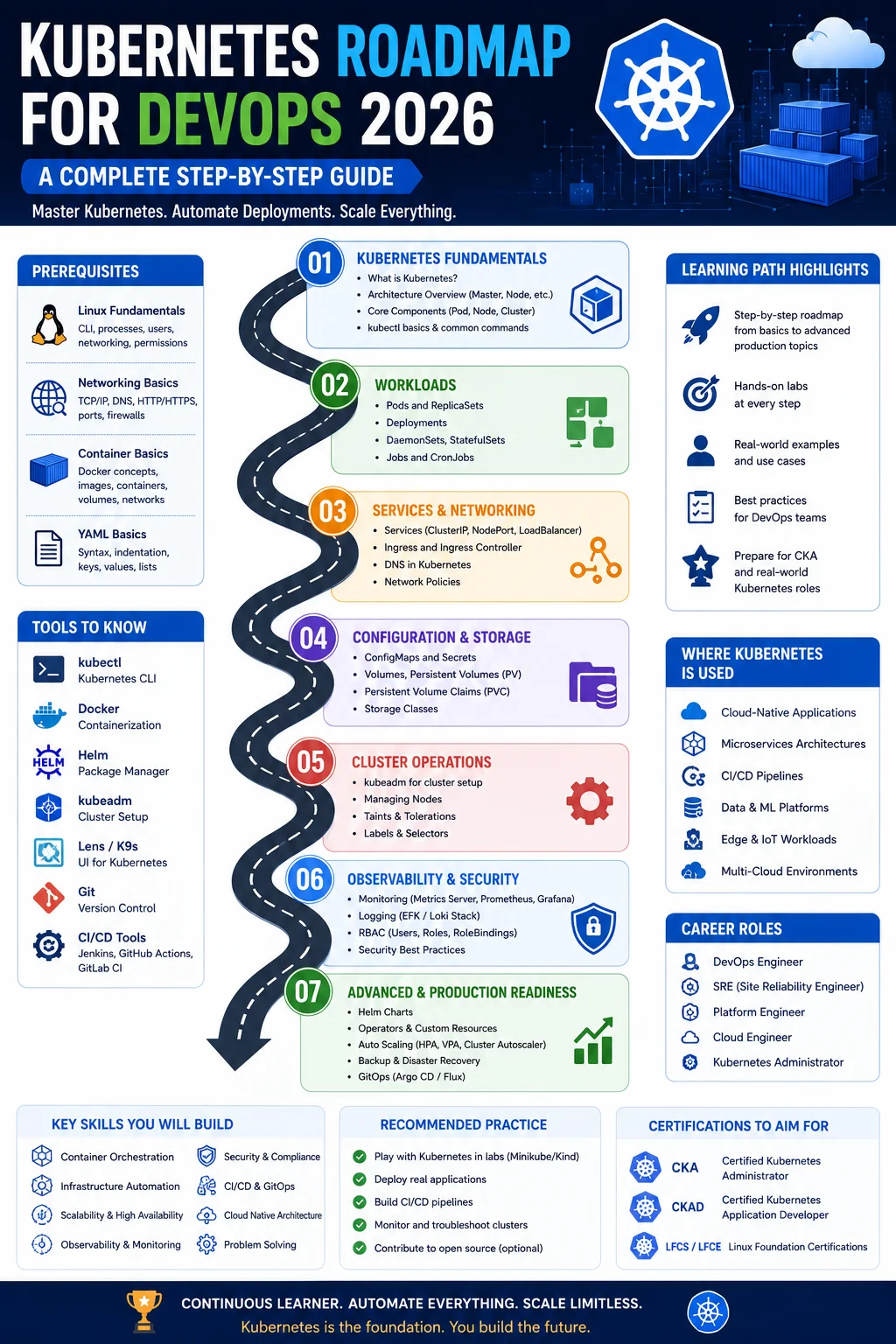
Published: May 2026
Kubernetes has gone from an ambitious Google-incubated project to the undisputed backbone of cloud-native infrastructure. In 2026, it is no longer a niche skill — it is a baseline expectation for anyone serious about a career in DevOps, platform engineering, or cloud architecture.
But here is the honest truth: Kubernetes has a steep learning curve, and most roadmaps online either oversimplify it into a weekend project or bury you in architecture diagrams before you have written a single manifest. Neither approach works.
I have been working in cloud and DevOps for over eight years, deploying and operating Kubernetes clusters across AWS EKS, Azure AKS, Google GKE, and on-premises environments. This roadmap is built from that real-world experience. It is structured progressively — each stage builds on the last — so you always know exactly where you are and what comes next.
If you have not yet worked through Docker fundamentals, I strongly recommend doing that first. Kubernetes orchestrates containers, and you will struggle to reason about it without understanding what is happening at the container level.
With that said, let us get into it.
Table of Contents
Why Kubernetes Is Non-Negotiable in 2026

Let me give you some context before we dive into the technical stages.
Kubernetes graduated from the Cloud Native Computing Foundation (CNCF) in 2018 and has since become the operating system of the cloud. As of 2026, virtually every major organization running microservices or containerized workloads at any meaningful scale uses Kubernetes — or a managed derivative of it (EKS, AKS, GKE, OpenShift).
What has shifted in 2026 is the expectations around Kubernetes knowledge. It is no longer enough to know how to write a basic Deployment manifest. Employers now expect DevOps engineers to understand cluster security, cost optimization, GitOps workflows, multi-cluster federation, and custom resource definitions. Platform engineering — building internal developer platforms on top of Kubernetes — is one of the fastest-growing specializations in the industry.
The good news: if you learn Kubernetes methodically and build real hands-on experience, you will be genuinely valuable. There is still a significant gap between people who know Kubernetes on paper and those who can operate it confidently in production.
This Kubernetes roadmap for devops 2026 aims to put you firmly in the second group.
Stage 1: Prerequisites — Docker, Linux, and YAML
Target Duration: Complete before starting Kubernetes
I am going to be direct here: skipping the prerequisites is the number one reason people struggle with Kubernetes. If any of the following feel shaky, spend a week or two reinforcing them before moving on.
Docker fundamentals you must know:
- Building and running Docker images and containers
- Writing Dockerfiles, understanding layers, multi-stage builds
- Docker Compose for multi-container applications
- Container networking and volume concepts
Linux fundamentals you must know:
- Command line navigation and file system structure
- Process management, file permissions
- Networking basics: IP addressing, DNS, ports, TCP/UDP
- Reading and writing shell scripts
YAML — the language of Kubernetes:
- YAML syntax: indentation, key-value pairs, lists, nested maps
- Common mistakes: tabs vs spaces (always spaces in YAML), string quoting
- How to validate YAML with tools like
yamllint
Almost every Kubernetes resource is defined in YAML. If YAML feels uncomfortable, Kubernetes will feel twice as hard. Spend an afternoon deliberately writing and parsing YAML files until it feels natural.
Stage 2: Kubernetes Architecture Deep Dive
Target Duration: 1 week
Before you run a single kubectl command, understand what Kubernetes actually is under the hood. This architectural knowledge is what allows you to diagnose production issues rather than guessing blindly.
The Control Plane (Master Node components):
- kube-apiserver: The front door of the entire cluster. Every command, every reconciliation loop, every external tool — they all talk to the API server. It validates and persists state to etcd.
- etcd: A distributed key-value store that holds the entire state of your cluster. Backing up etcd is not optional in production — it is how you recover from a catastrophic failure.
- kube-scheduler: Watches for newly created pods with no assigned node and selects the best node for them based on resource availability, affinity rules, taints, and tolerations.
- kube-controller-manager: Runs a collection of controller loops. The Deployment controller, ReplicaSet controller, Node controller, and others all live here. They watch actual state and reconcile it toward desired state.
- cloud-controller-manager: Integrates with cloud provider APIs (AWS, Azure, GCP) to provision load balancers, persistent disks, and node objects.
The Data Plane (Worker Node components):
- kubelet: The agent that runs on every worker node. It receives pod specifications from the API server and ensures the containers described in those specs are running and healthy.
- kube-proxy: Maintains network rules on each node to implement Kubernetes Services. In most modern clusters, this is handled by eBPF-based solutions like Cilium instead.
- Container Runtime: The software that actually runs containers — in 2026, this is typically containerd or CRI-O, not Docker Engine directly.
The reconciliation loop (the most important concept in all of Kubernetes):
Kubernetes is a declarative system. You tell it what you want (desired state), and it continuously works to make reality match that (actual state). This loop never stops. It is what makes Kubernetes self-healing — if a pod crashes, the controller notices the drift and creates a replacement.
Understanding this loop changes how you think about everything else in Kubernetes.
Stage 3: Setting Up Your Local Lab Environment
Target Duration: 2–3 days
Get a working Kubernetes environment on your machine before you proceed. You need somewhere to practice — reading without doing is not enough.
Option 1: minikube (recommended for beginners)
- Runs a single-node Kubernetes cluster in a VM or container on your laptop
- Supports multiple Kubernetes versions, addons (dashboard, metrics-server, ingress)
- Simple:
minikube startto spin up,minikube deleteto tear down - Install: https://minikube.sigs.k8s.io
Option 2: kind (Kubernetes IN Docker)
- Runs Kubernetes nodes as Docker containers
- Excellent for testing multi-node setups and CI environments
- Slightly more technical but very lightweight
- Install: https://kind.sigs.k8s.io
Option 3: k3s or k3d
- Lightweight Kubernetes distribution by Rancher
- k3d runs k3s in Docker containers — great for local multi-node clusters
- Very fast startup, minimal resource usage
Setting up kubectl:
- kubectl is the CLI for interacting with any Kubernetes cluster
- Learn these commands early:
get,describe,apply,delete,logs,exec,port-forward - Set up shell autocompletion — it saves enormous amounts of typing
Optional but highly recommended: k9s
- A terminal-based UI for Kubernetes that dramatically speeds up cluster navigation
- Real DevOps engineers use this constantly in production
Stage 4: Core Kubernetes Objects — Pods, Deployments, Services
Target Duration: 3–4 weeks
This is the heart of Kubernetes. Everything else builds on top of these three objects. Take your time here and do not rush through.
Pods:
A Pod is the smallest deployable unit in Kubernetes. It wraps one or more containers that share a network namespace and storage volumes. In practice, most Pods contain a single container — multi-container Pods are used for specific sidecar patterns.
Key things to understand:
- Pods are ephemeral. They are not meant to be persistent or resurrected — that is what controllers are for.
- Every Pod gets its own IP address within the cluster network.
- Init containers run to completion before the main container starts — useful for setup tasks.
- Sidecar containers run alongside the main container (logging agents, service mesh proxies).
ReplicaSets:
A ReplicaSet ensures that a specified number of identical Pod replicas are running at all times. If a Pod dies, the ReplicaSet creates a new one. In practice, you almost never create ReplicaSets directly — Deployments manage them for you.
Deployments:
Deployments are how you manage stateless applications in Kubernetes. They provide:
- Declarative updates: change the image tag in the manifest, apply it, Kubernetes rolls out the update progressively
- Rolling updates: replaces Pods gradually, ensuring zero downtime
- Rollback:
kubectl rollout undo deployment/my-apptakes you back to the previous version instantly - Pause and resume: useful for emergency brakes during a bad rollout
Services:
Pods are ephemeral and their IPs change constantly. Services provide a stable network endpoint.
- ClusterIP (default): Internal-only virtual IP. Other pods inside the cluster reach your app through this.
- NodePort: Exposes the service on a static port on every node. Useful for testing; not ideal for production.
- LoadBalancer: Provisions a cloud load balancer (AWS ALB/NLB, Azure Load Balancer) and exposes the service externally. This is how production traffic usually enters.
- ExternalName: Maps a service to a DNS name outside the cluster.
StatefulSets:
For stateful applications like databases, message queues, and search engines. Unlike Deployments, StatefulSets give each Pod a stable, predictable identity (pod-0, pod-1, pod-2) and stable storage. Essential for running MongoDB, Cassandra, Kafka, and similar systems on Kubernetes.
DaemonSets:
Ensures one Pod runs on every node (or a subset of nodes). Perfect for log collectors (Fluentd, Filebeat), monitoring agents (node-exporter), and network plugins.
Jobs and CronJobs:
Jobs run a container to completion — for one-off batch tasks. CronJobs schedule Jobs on a cron schedule — for periodic tasks like database backups, report generation, and cleanup scripts.
Practice project: Deploy a stateless web application with a Deployment (3 replicas), expose it with a ClusterIP Service, and access it using kubectl port-forward. Then update the container image and watch the rolling update happen. Practice rolling back.
Stage 5: Configuration and Secrets Management
Target Duration: 1–2 weeks
Hardcoding configuration into container images is an anti-pattern. Kubernetes provides two objects for externalizing configuration.
ConfigMaps:
Store non-sensitive configuration data as key-value pairs. Can be consumed by Pods as environment variables, command-line arguments, or mounted as files inside the container.
Use ConfigMaps for: application configuration files, feature flags, environment-specific settings (base URLs, log levels), and non-sensitive connection parameters.
Secrets:
Store sensitive data like passwords, API keys, TLS certificates, and tokens. Kubernetes stores them base64-encoded in etcd by default — this is encoding, not encryption.
Critical security practices for Secrets:
- Enable etcd encryption at rest — not enabled by default in most clusters. Essential in production.
- Use external secret managers like AWS Secrets Manager, Azure Key Vault, or HashiCorp Vault with the External Secrets Operator (ESO). This is the 2026 standard for production environments.
- RBAC restriction — limit which service accounts and users can read Secrets in a namespace.
- Never commit Secrets to Git — use Sealed Secrets or ESO to manage this safely.
Downward API:
Allows Pods to consume metadata about themselves (Pod name, namespace, node name, labels) as environment variables or files. Surprisingly useful for logging and tracing.
Stage 6: Storage in Kubernetes
Target Duration: 1–2 weeks
Stateful workloads need persistent storage that survives Pod restarts and rescheduling. Kubernetes has a flexible, layered storage system.
Core storage concepts:
- Volumes: A directory accessible to containers in a Pod. Many types exist: emptyDir (ephemeral, in-memory or on-disk), hostPath (mounts a node directory — risky in production), configMap, secret, and more.
- Persistent Volumes (PV): A piece of storage in the cluster provisioned by an administrator or dynamically by a StorageClass. Lives independently of any Pod.
- Persistent Volume Claims (PVC): A request for storage by a Pod. The user specifies size and access mode; Kubernetes binds it to a matching PV.
- StorageClass: Defines the “class” of storage — the provisioner (AWS EBS, GCP PD, Azure Disk, NFS), performance tier, and reclaim policy. Enables dynamic provisioning: create a PVC, a PV is automatically created and bound.
Access modes:
- ReadWriteOnce (RWO): Mounted by one node at a time. Standard for block storage (EBS, Azure Disk).
- ReadOnlyMany (ROX): Mounted by many nodes simultaneously, read-only.
- ReadWriteMany (RWX): Mounted by many nodes simultaneously, read-write. Requires shared storage (NFS, EFS, Azure Files).
Container Storage Interface (CSI):
CSI is the plugin standard for storage in Kubernetes. Cloud providers and storage vendors ship CSI drivers for their systems. In 2026, CSI is universal — if you are integrating storage, you will interact with a CSI driver.
Practice: Deploy PostgreSQL on Kubernetes using a StatefulSet with a PVC backed by a local StorageClass. Simulate a Pod deletion and verify the data persists when the Pod is recreated.
Stage 7: Kubernetes Networking
Target Duration: 2 weeks
Kubernetes networking is one of the most complex areas in the entire ecosystem — and one of the most important to understand for production operations.
The Kubernetes networking model (four rules):
- Every Pod gets its own unique IP address
- Pods on any node can communicate with all Pods on all nodes without NAT
- Agents on a node (kubelet, kube-proxy) can communicate with all Pods on that node
- Pods that choose to advertise themselves as Services get stable virtual IPs
Container Network Interface (CNI):
CNI plugins implement the networking model. Popular options in 2026:
- Flannel: Simple, reliable, good for getting started
- Calico: Network policy support, high performance, widely used in production
- Cilium: eBPF-based, best performance, Layer 7 visibility and policy — the growing standard in 2026
- Weave Net: Multi-host networking with encryption
Network Policies:
By default, all Pods in a cluster can communicate with each other. Network Policies are Kubernetes objects that define allow/deny rules for Pod-to-Pod and Pod-to-external traffic. Think of them as firewall rules inside the cluster.
This is a critical security control. Always define Network Policies for production namespaces. Default-deny policies are the recommended starting point.
Ingress and Ingress Controllers:
Services of type LoadBalancer create one cloud load balancer per service — expensive at scale. Ingress provides HTTP/HTTPS routing rules that funnel traffic from a single load balancer to multiple services based on hostname and path.
- Ingress resource: Kubernetes object defining routing rules
- Ingress Controller: The actual software that implements those rules (runs as a Pod). Options: Nginx Ingress Controller, Traefik, HAProxy, AWS ALB Controller, Google Cloud Load Balancing.
Gateway API:
The successor to Ingress. More expressive, more role-oriented, and more flexible. Gateway API reached GA in Kubernetes 1.28 and is gaining rapid adoption in 2026. Start learning it alongside Ingress.
DNS in Kubernetes:
CoreDNS is the default DNS server in Kubernetes. It automatically creates DNS entries for Services, enabling Pods to reach a service by name: my-service.my-namespace.svc.cluster.local. Understanding this DNS schema is essential for service discovery.
Stage 8: Cluster Security and RBAC
Target Duration: 2–3 weeks
Security in Kubernetes is deep, multi-layered, and in 2026, heavily scrutinized. Misconfigured Kubernetes clusters have been the source of high-profile breaches at major organizations. Take this stage seriously.
Role-Based Access Control (RBAC):
RBAC controls who can do what within the cluster.
- Role / ClusterRole: Defines a set of permissions (verbs on resources). Roles are namespace-scoped; ClusterRoles are cluster-wide.
- RoleBinding / ClusterRoleBinding: Grants a Role or ClusterRole to a user, group, or ServiceAccount.
- Principle of least privilege: Grant only the permissions actually needed. Avoid
cluster-adminbindings except for cluster operators. - ServiceAccounts: Identity for Pods. Every Pod runs as a ServiceAccount. Restrict what each ServiceAccount can do.
Pod Security:
- Security Contexts: Define privilege and access control at the Pod and container level. Always set
runAsNonRoot: true,readOnlyRootFilesystem: true, and drop unnecessary Linux capabilities. - Pod Security Admission (PSA): Replaced PodSecurityPolicy in Kubernetes 1.25. Enforces pod security standards (Privileged, Baseline, Restricted) at the namespace level.
- OPA/Gatekeeper or Kyverno: Policy engines for custom admission control. Define and enforce organizational policies across all resources in the cluster.
Supply chain security:
- Image scanning: Integrate Trivy or Snyk into your CI pipeline. Block images with critical CVEs from being deployed.
- Image signing: Use Cosign (from the Sigstore project) to sign images and verify them at admission time with tools like Connaisseur or Policy Controller.
- Admission webhooks: Mutating and validating webhooks intercept API requests and can modify or reject resources before they are persisted. The basis for tools like Kyverno and Gatekeeper.
Secrets encryption:
Enable EncryptionConfiguration for Secrets and other sensitive resources in etcd. Without this, Secrets are stored in plaintext (base64 encoded) in etcd, which is recoverable.
Network security:
- Implement Network Policies for all namespaces
- Use a service mesh (Istio, Linkerd, Cilium) for mutual TLS (mTLS) between services
- Restrict egress from the cluster to known external endpoints
CIS Kubernetes Benchmark:
The Center for Internet Security publishes a Kubernetes benchmark with hundreds of specific security checks. Use kube-bench (an open-source tool) to audit your cluster against this benchmark. This is standard practice before going to production.
Stage 9: Helm — The Kubernetes Package Manager
Target Duration: 2 weeks
Helm is how most teams manage Kubernetes applications in practice. It is not optional — nearly every production Kubernetes environment uses it.
What Helm solves:
Deploying an application to Kubernetes involves many YAML files — Deployments, Services, ConfigMaps, Ingresses, RBAC rules, ServiceAccounts. Managing these across multiple environments (dev, staging, production) with different values for each is painful without templating. Helm wraps all of these files into a chart and lets you parameterize values.
Core Helm concepts:
- Chart: A package of Kubernetes manifests with a templating engine. Think of it like an apt or npm package for Kubernetes.
- Values: User-supplied configuration that overrides defaults in a chart. Passed in with
--values values.yamlor--set key=value. - Release: A specific installation of a chart in a cluster. One chart can be installed multiple times as different releases.
- Repository: A collection of packaged charts. Artifact Hub (artifacthub.io) is the public chart repository in 2026.
Key Helm commands to master:
helm install,helm upgrade,helm rollbackhelm repo add,helm search repohelm template— render chart templates locally without installinghelm lint— validate chart structure and syntaxhelm diff— show what would change before applying an upgrade (requires the diff plugin)
Writing your own charts:
Beyond using third-party charts, you should be able to write your own. Chart structure: Chart.yaml, values.yaml, templates/ directory. Learn Helm template functions: tpl, include, toYaml, required, named templates.
Helmfile:
A tool for managing multiple Helm releases declaratively across environments. Think of it as Terraform for Helm. Widely used in large organizations.
Practice: Write a Helm chart for your own application. Deploy it to three different namespaces (representing dev/staging/prod) with different values files for each. Practice upgrading the chart and rolling back.
Stage 10: Kubernetes in CI/CD Pipelines
Target Duration: 2 weeks
Kubernetes is the deployment target for most modern CI/CD pipelines. Understanding how to integrate it properly — with proper security controls — is essential.
Common CI/CD patterns for Kubernetes:
Push-based deployment (traditional CI/CD):
- Developer pushes code → CI pipeline triggers
- CI builds Docker image, runs tests, scans for vulnerabilities
- CI pushes image to registry with a unique tag (commit SHA)
- CI authenticates to the Kubernetes cluster and applies updated manifests with
kubectl applyorhelm upgrade
Pull-based deployment (GitOps — covered in Stage 11):
- CI builds and pushes image, updates the image tag in a Git repository
- A GitOps operator running in the cluster detects the change and applies it
Security considerations for CI/CD:
- Use short-lived credentials (IRSA on AWS, Workload Identity on GCP) rather than long-lived kubeconfig files in CI systems
- Grant CI systems the minimum RBAC permissions needed — typically only the ability to update Deployments in specific namespaces
- Never store cluster admin kubeconfig in CI secret stores if avoidable
Tools and integrations:
- GitHub Actions:
azure/setup-kubectl,aws-actions/amazon-eks-login,google-github-actions/get-gke-credentialsfor cluster access - GitLab CI: Built-in Kubernetes integration and Kubernetes agent
- Tekton: Kubernetes-native CI/CD framework — pipelines run as Pods inside the cluster
- Argo Workflows: Kubernetes-native workflow engine for complex pipelines
Practice: Build a GitHub Actions pipeline that builds a Docker image, scans it with Trivy, updates the image tag in a Helm values file, and deploys to a local kind cluster. Observe the rollout.
Stage 11: GitOps with ArgoCD and Flux
Target Duration: 2–3 weeks
GitOps is now the dominant continuous delivery model for Kubernetes in 2026. If you are operating any production Kubernetes environment, you are almost certainly using either ArgoCD or Flux.
The GitOps principles:
- Declarative: Desired system state is expressed declaratively (YAML manifests, Helm values)
- Versioned and immutable: Desired state is stored in Git — the single source of truth
- Pulled automatically: Software agents (ArgoCD, Flux) pull the desired state and apply it
- Continuously reconciled: Software agents continuously ensure actual state matches desired state
Why GitOps over traditional push-based CD:
- No cluster credentials in CI systems — the GitOps operator has cluster access, not the CI pipeline
- Every infrastructure change is a Git commit — full audit trail, peer review via pull requests, easy rollback via
git revert - Self-healing: if someone manually changes a resource in the cluster, the GitOps operator reverts it to the state defined in Git
ArgoCD:
ArgoCD is a Kubernetes-native continuous delivery tool with an excellent web UI. Key concepts:
- Application: An ArgoCD object that maps a Git repo path to a Kubernetes cluster/namespace
- Sync: The process of applying Git state to the cluster
- Sync Policies: Automatic sync, self-heal, prune (delete resources removed from Git)
- App of Apps pattern: An ArgoCD Application that deploys other Applications — enables managing hundreds of apps declaratively
- ApplicationSets: Templatize Application creation across clusters and environments
Flux v2:
Flux is a CNCF-graduated GitOps toolkit. More modular and CLI-oriented than ArgoCD.
- Source Controller: Watches Git repos, Helm repos, OCI registries
- Kustomize Controller: Applies Kustomize configurations from sources
- Helm Controller: Manages Helm releases from sources
- Notification Controller: Sends alerts to Slack, Teams, PagerDuty on reconciliation events
- Image Automation Controller: Automatically updates image tags in Git when new images are pushed
Which one to learn? ArgoCD for teams that want a UI-first experience and centralized management. Flux for teams that prefer a CLI/GitOps-native workflow and more modular architecture. In 2026, many organizations use both in different capacities. Learning ArgoCD first is a common path since the UI makes the GitOps concepts visible.
Stage 12: Observability — Metrics, Logs, and Traces
Target Duration: 2–3 weeks
You cannot operate what you cannot observe. Kubernetes adds layers of complexity — pods rescheduling, horizontal scaling, node failures — that make observability non-negotiable.
Metrics with Prometheus and Grafana:
- Prometheus: Pull-based time-series metrics database. Scrapes metrics endpoints exposed by applications and Kubernetes components.
- kube-state-metrics: Exposes metrics about Kubernetes object state (deployment replicas, pod status, etc.)
- node-exporter: Exposes hardware and OS-level metrics from each node
- Grafana: Visualization and dashboarding layer for Prometheus data. Pre-built dashboards exist for Kubernetes, Nginx, PostgreSQL, and most common workloads.
- Alertmanager: Routes Prometheus alerts to PagerDuty, Slack, OpsGenie, email, etc.
- kube-prometheus-stack: A Helm chart that deploys the entire monitoring stack in one command. The standard way to set up monitoring in 2026.
Logging with Loki or ELK:
- Loki + Promtail + Grafana: Lightweight, Kubernetes-native log aggregation. Loki indexes only labels (not the full log content), making it much cheaper to operate than Elasticsearch. The 2026 default for many teams.
- ELK Stack (Elasticsearch + Logstash + Kibana) / OpenSearch: More powerful querying but significantly higher resource consumption and operational complexity. Still common in large enterprises.
- Fluentd / Fluent Bit: Log collectors that run as DaemonSets on every node and forward logs to the aggregation system.
Distributed Tracing:
- OpenTelemetry: The vendor-neutral standard for instrumentation — traces, metrics, and logs from a single SDK. Reached maturity in 2024 and is now the dominant approach in 2026.
- Jaeger / Tempo: Distributed tracing backends. Grafana Tempo integrates well with the Loki + Prometheus stack (the Grafana LGTM stack — Loki, Grafana, Tempo, Mimir).
- Service Mesh observability: Istio and Linkerd automatically generate traces and metrics for inter-service calls without code changes.
Practice: Deploy the kube-prometheus-stack via Helm on your local cluster. Import a Kubernetes cluster dashboard in Grafana. Set up an alert rule that fires when Pod restarts exceed a threshold.
Stage 13: Scaling, Autoscaling, and Resource Management
Target Duration: 2 weeks
Resource management and autoscaling separate clusters that work from clusters that work well. This is where Kubernetes becomes genuinely powerful — and where misconfiguration causes the most expensive production problems.
Resource requests and limits:
Every container should define CPU and memory requests and limits.
- Requests: The amount of resource the scheduler guarantees the container. Used to place pods on nodes with enough capacity.
- Limits: The maximum the container can consume. Containers exceeding CPU limits are throttled; containers exceeding memory limits are OOMKilled.
The golden rule: set requests at the typical usage level, set limits at the maximum acceptable usage. Leaving requests and limits undefined leads to noisy-neighbor problems and unpredictable performance.
Quality of Service (QoS) classes:
- Guaranteed: Requests = Limits (safest — these pods are evicted last)
- Burstable: Requests < Limits
- BestEffort: No requests or limits (evicted first under node pressure)
Horizontal Pod Autoscaler (HPA):
Automatically scales the number of Pod replicas based on CPU utilization, memory utilization, or custom metrics (request rate, queue depth, etc.). In 2026, KEDA (Kubernetes Event-Driven Autoscaling) extends HPA with dozens of event sources — scale based on Kafka lag, SQS queue depth, Prometheus metrics, and more.
Vertical Pod Autoscaler (VPA):
Automatically adjusts container resource requests based on historical usage. Useful for right-sizing workloads without manual tuning. Note: VPA currently restarts pods to apply changes, so it is not suitable for every workload.
Cluster Autoscaler:
Scales the number of nodes in the cluster. When pods cannot be scheduled due to insufficient resources, Cluster Autoscaler provisions new nodes. When nodes are underutilized, it drains and terminates them. Integrates with AWS Auto Scaling Groups, GCP Managed Instance Groups, and Azure VMSS.
Karpenter (AWS) and similar tools:
Karpenter is a newer, faster node autoscaler from AWS that provisions nodes in seconds and is highly cost-efficient. Widely adopted in AWS EKS environments in 2026. GCP has its own Autopilot mode for GKE.
LimitRanges and ResourceQuotas:
- LimitRange: Sets default and maximum resource constraints for containers in a namespace
- ResourceQuota: Sets total resource ceilings for an entire namespace — prevents any one team from consuming the whole cluster
Stage 14: Multi-Cluster and Multi-Cloud Kubernetes
Target Duration: 2–3 weeks
At scale, organizations run multiple Kubernetes clusters — for availability, compliance, geographic distribution, or multi-cloud strategy. Understanding multi-cluster patterns is becoming an expected skill at senior level.
Why multiple clusters?
- Environment isolation: Separate clusters for dev, staging, production. Reduces the blast radius of mistakes.
- Regional distribution: Deploy clusters in multiple regions for latency and disaster recovery.
- Compliance: Some workloads must run in specific regions or on specific infrastructure for regulatory reasons.
- Multi-cloud: Avoid vendor lock-in by distributing workloads across AWS, GCP, and Azure.
- Blast radius reduction: A single large cluster failing takes everything with it. Multiple smaller clusters limit the damage.
Multi-cluster tooling:
- ArgoCD multi-cluster: Register multiple clusters in ArgoCD and deploy applications to all of them from a central ArgoCD instance (hub-and-spoke model).
- Flux with multi-tenancy: Flux supports managing multiple clusters from a single Git repository structure.
- Cluster API (CAPI): Kubernetes-native cluster lifecycle management. Define, provision, and upgrade clusters using Kubernetes CRDs. Supports AWS, Azure, GCP, vSphere, and more.
- Liqo / Admiralty: Tools for workload federation across clusters.
- Istio multi-cluster / Cilium Cluster Mesh: Service mesh solutions that enable transparent communication across cluster boundaries.
Multi-cluster observability:
- Thanos or Cortex: Long-term Prometheus storage and multi-cluster querying
- Grafana with multiple data sources: Query metrics from all clusters in a single Grafana instance
- OpenTelemetry Collector pipeline: Centralize traces and logs from all clusters in a single backend
Stage 15: Kubernetes in 2026 — AI, FinOps, and Platform Engineering
Target Duration: Ongoing
The Kubernetes ecosystem does not stand still. These are the forces shaping how Kubernetes is used and operated right now in 2026.
AI/ML workloads on Kubernetes:
Kubernetes has become the dominant platform for running AI and ML workloads. Key developments:
- GPU scheduling: Kubernetes now supports fractional GPU allocation and multi-GPU workloads natively. The NVIDIA GPU Operator simplifies driver and plugin management.
- KubeFlow: The open-source ML platform built on Kubernetes for managing ML pipelines, model training, and serving.
- Ray on Kubernetes: Distributed Python compute framework for ML, increasingly popular in 2026.
- LeaderWorkerSet and LWS: A new Kubernetes API for managing distributed training jobs.
- Model serving: vLLM, Triton Inference Server, and BentoML are popular frameworks for serving LLMs on Kubernetes.
AI-assisted Kubernetes operations:
- k8sgpt: CLI tool that analyzes Kubernetes cluster issues and explains them in plain language using LLMs. Run
k8sgpt analyzeto get an instant human-readable summary of what is wrong with your cluster. - Robusta: Kubernetes monitoring and automation platform with AI-assisted alert triage.
- Kubectl AI plugins: Several plugins now let you describe what you want to do in natural language and generate the corresponding YAML or kubectl commands.
FinOps for Kubernetes:
As Kubernetes adoption matures, cost optimization has become a serious discipline.
- Kubecost: Open-source tool for Kubernetes cost monitoring and allocation. Shows you exactly which namespaces, teams, and workloads are responsible for which cloud costs.
- OpenCost: CNCF-sponsored open-source cost monitoring standard.
- Right-sizing: VPA recommendations, Goldilocks (a VPA UI), and LLM-powered recommendation tools help identify over-provisioned workloads.
- Spot/Preemptible instances: Running non-critical workloads on spot instances with Karpenter can cut compute costs by 60–90%.
Platform Engineering:
Platform engineering — building internal developer platforms (IDPs) on top of Kubernetes — is the fastest-growing specialization in DevOps in 2026.
- Backstage: Spotify’s open-source developer portal. The standard IDP frontend in 2026.
- Crossplane: Manage cloud infrastructure (databases, queues, storage) from Kubernetes using the Kubernetes API.
- Port, Cortex, OpsLevel: Commercial IDP platforms.
- Kubernetes as a platform: Self-service environments, golden paths, paved roads — giving developers the ability to provision, deploy, and operate their own services without opening tickets.
Your 2026 Learning Timeline
Here is a realistic schedule if you are committing 1–2 focused hours per day and already have Docker fundamentals covered:
| Stage | Focus Area | Duration |
|---|---|---|
| Stage 2 | Kubernetes Architecture | Week 1 |
| Stage 3 | Local Lab Setup | Week 1–2 |
| Stage 4 | Core Objects (Pods, Deployments, Services) | Weeks 2–5 |
| Stage 5 | Config and Secrets | Weeks 6–7 |
| Stage 6 | Storage | Weeks 7–8 |
| Stage 7 | Networking | Weeks 9–10 |
| Stage 8 | Security and RBAC | Weeks 11–13 |
| Stage 9 | Helm | Weeks 14–15 |
| Stage 10 | CI/CD Integration | Weeks 16–17 |
| Stage 11 | GitOps (ArgoCD / Flux) | Weeks 18–20 |
| Stage 12 | Observability | Weeks 21–23 |
| Stage 13 | Scaling and Resource Management | Weeks 24–25 |
| Stage 14 | Multi-Cluster | Weeks 26–28 |
| Stage 15 | AI, FinOps, Platform Engineering | Ongoing |
Total estimated time for job-ready competency (through Stage 11): 5–6 months Total estimated time for senior-level proficiency (all stages): 8–12 months with real project experience alongside study
Additional Resources
Official Documentation
- Kubernetes Official Docs — Non-negotiable primary reference
- CNCF Landscape — Map of the entire cloud-native ecosystem
- Kubernetes Blog — Release notes, feature deep dives, and community content
YouTube Channels
- TechWorld with Nana — Clear, beginner-friendly Kubernetes walkthroughs
- DevOps Toolkit — Deep, opinionated content on GitOps and Kubernetes operations
- That DevOps Guy — Practical Kubernetes content for real-world scenarios
- CNCF YouTube Channel — KubeCon talks and project deep dives
Certifications
- Certified Kubernetes Administrator (CKA) — Operations-focused. Validates cluster setup, maintenance, troubleshooting, and networking. The most respected Kubernetes credential.
- Certified Kubernetes Application Developer (CKAD) — Developer-focused. Validates building and deploying applications on Kubernetes.
- Certified Kubernetes Security Specialist (CKS) — Requires CKA as a prerequisite. Validates cluster and container security. Increasingly in demand.
All three are performance-based exams (you work in a live cluster, no multiple choice) — which makes passing them genuinely meaningful. Start with CKAD if you are more developer-oriented, CKA if you are more operations-oriented.
Frequently Asked Questions
Q1: How long does it take to learn Kubernetes from scratch?
If you already have Docker and Linux fundamentals, expect 5–6 months of consistent daily practice to reach a level where you can confidently operate Kubernetes in a professional environment. Full senior-level proficiency — cluster design, security hardening, multi-cluster, FinOps — takes 12–18 months of real project experience on top of study. Do not let this discourage you. The first 3 months cover about 80% of what you will do day-to-day.
Q2: Do I need to know Docker before learning Kubernetes?
Yes. Kubernetes orchestrates containers, and when things break — a container crashes, a pod exits with an error, an image fails to pull — you need to understand containers to debug the problem. Engineers who skip Docker and jump straight to Kubernetes consistently struggle with production troubleshooting. Spend 4–6 weeks on Docker fundamentals first.
Q3: Should I self-host Kubernetes or use a managed service like EKS, AKS, or GKE?
For learning: use minikube or kind locally, and then get hands-on with a managed service using a free trial or small personal cluster. For production: almost always use a managed service. Managing your own control plane (etcd, kube-apiserver, certificate rotation) is a significant operational burden that rarely makes sense outside of very specific requirements. AWS EKS, Azure AKS, and Google GKE handle the control plane for you.
Q4: Is Kubernetes overkill for small applications?
Probably yes, if you have a single application and a small team. Kubernetes has real operational overhead. For small projects, Docker Compose, AWS ECS, Fly.io, Railway, or Render are often better choices. Kubernetes earns its complexity at scale — multiple services, multiple teams, traffic that varies significantly, or strict availability requirements. Learn it because it is a career-defining skill, but do not force it onto every problem.
Q5: What is the difference between CKA and CKAD?
CKA (Certified Kubernetes Administrator) focuses on cluster operations — setting up clusters, managing nodes, troubleshooting control plane components, configuring networking and storage. CKAD (Certified Kubernetes Application Developer) focuses on deploying and managing applications on an existing cluster — writing manifests, configuring deployments, working with ConfigMaps and Secrets, setting up Ingress. Start with CKAD if you are a developer or application engineer. Start with CKA if you are in an operations or infrastructure role.
Q6: What is Helm and is it actually necessary?
Helm is the package manager for Kubernetes, and in practice, yes — it is necessary. Almost every production Kubernetes environment uses Helm to manage third-party software (Prometheus, Nginx, cert-manager, ArgoCD itself) and many teams use it to manage their own application deployments. Without Helm, managing environment-specific configuration across dev, staging, and production becomes painful very quickly. Learn Helm after you are comfortable with raw YAML manifests — do not use it as a shortcut to avoid learning manifests.
Q7: ArgoCD or Flux — which one should I learn first?
ArgoCD. Its web UI makes GitOps concepts visible and tangible in a way that Flux’s CLI-first approach does not. Once you understand what GitOps is actually doing in ArgoCD, picking up Flux is straightforward. If you are preparing for a job that specifically uses Flux, start with Flux — but ArgoCD is the more common first exposure.
Q8: How do I keep up with Kubernetes changes? It moves fast.
Kubernetes releases three minor versions per year. The CNCF newsletter (cncf.io/newsletter), the official Kubernetes blog, and the KubeCon conference talks (available on CNCF YouTube) are the best ways to stay current. Follow contributors and platform engineers on LinkedIn and X. Reading release notes for each new version takes about 30 minutes and is worth doing. Focus on understanding the direction and principles — specific API details you can always look up.
About the Author
Kedar Salunkhe is a Cloud and DevOps Engineer with over 8 years of hands-on experience designing, deploying, and operating infrastructure for organizations of all sizes — from high-growth startups to large enterprise environments.
Over his career, Kedar has worked extensively with Kubernetes across AWS EKS, Azure AKS, Google GKE, and on-premises deployments. He has designed multi-cluster architectures, built GitOps delivery pipelines, led container security hardening initiatives, and mentored engineering teams making the transition to cloud-native infrastructure.
He is a strong believer that good DevOps education should be practical, honest about complexity, and grounded in real-world trade-offs — not marketing material dressed up as a tutorial.
Want to connect or ask a question? Reach out through the contact page or find Kedar on LinkedIn.
Last updated: May 2026 | This article reflects the current state of the Kubernetes ecosystem as of mid-2026. The CNCF landscape evolves rapidly — always verify tool recommendations against current documentation and community adoption.