
Published: May 2026
If you are building a career in DevOps in 2026 or trying to level up your existing skills, Docker is still one of the most critical tools you need to master. The container ecosystem has matured significantly, but the fundamentals remain non-negotiable — and new layers like security hardening, GitOps workflows, and AI-assisted operations are now part of the landscape too.
I have spent the last eight years working with cloud and DevOps environments, and in that time I have watched Docker evolve from a developer curiosity into the backbone of modern software delivery. This guide is the roadmap I wish I had when I started — practical, opinionated, and updated for 2026.
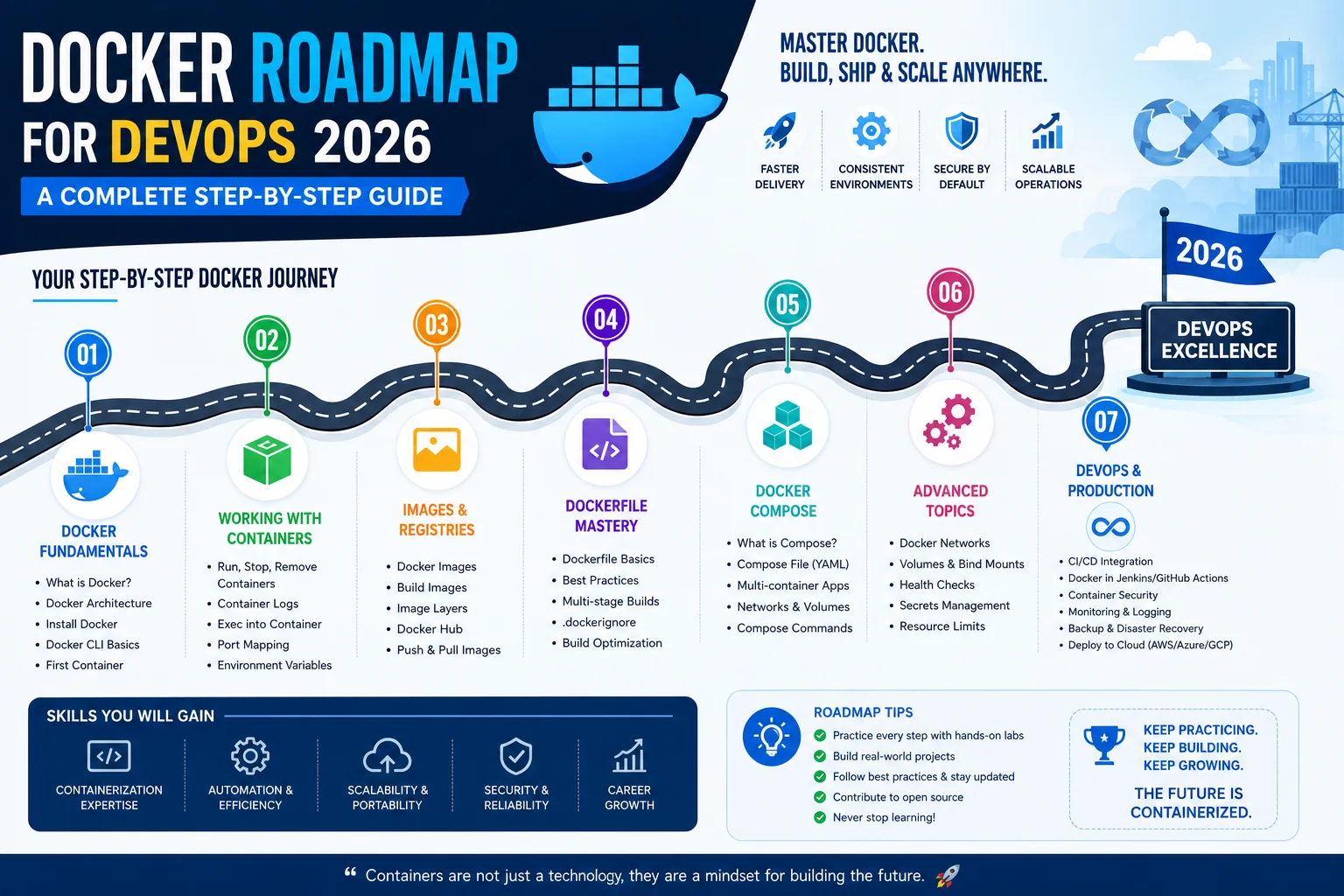
Whether you are a complete beginner or someone filling in the gaps, this roadmap docker roadmap for devops breaks down every stage in a logical sequence so you are never guessing what to learn next.
Table of Contents
Why Docker Still Matters in 2026

Before we get into the roadmap itself, let us answer the question that often comes up: Is Docker still relevant in 2026?
The short answer is yes — more than ever.
While the container runtime ecosystem now includes alternatives like Podman, containerd, and CRI-O, Docker Desktop and the Docker CLI remain the primary entry points for the vast majority of developers and DevOps teams. According to the Stack Overflow Developer Survey and various industry reports, Docker consistently ranks as one of the most-used and most-loved tools in the DevOps space.
What has changed is the context. In 2026, Docker does not live in a vacuum. You are expected to understand how containers integrate into Kubernetes clusters, how they fit into GitOps workflows, how they are scanned for vulnerabilities in a CI/CD pipeline, and how they run at scale in managed cloud environments like AWS ECS, Azure Container Apps, and Google Cloud Run.
That is exactly what this roadmap covers.
Stage 1: Get Comfortable with Linux Fundamentals
Target Duration: 2–3 weeks (for beginners)
This is the stage most people skip, and it comes back to haunt them. Docker is built on Linux kernel features — specifically namespaces, cgroups, and the union file system. You do not need to be a Linux systems engineer, but you do need a working understanding of the command line.
Key topics to cover:
- File system structure (/etc, /var, /usr, /home)
- File permissions and ownership (chmod, chown)
- Process management (ps, kill, systemctl)
- Networking basics (ifconfig/ip, netstat, curl, ping)
- Package management (apt, yum/dnf)
- Shell scripting basics (bash, variables, loops, conditionals)
- Text processing (grep, awk, sed, cat, tail)
Why it matters for Docker: When a container exits unexpectedly or a port binding fails, your ability to debug it comes down to Linux knowledge. You will also write shell scripts inside Dockerfiles, and understanding file permissions prevents a large class of security mistakes.
Recommended starting point: Spin up an Ubuntu 22.04 or Debian VM on VirtualBox, AWS, or any free-tier cloud provider and spend time on the terminal daily. There is no shortcut here.
Stage 2: Understand Containerization Concepts
Target Duration: 1 week
Before writing a single docker run command, invest time in understanding what containers actually are. This conceptual clarity saves hours of confusion later.
Core concepts to understand:
- What is a container? A container is a lightweight, standalone, executable package that includes everything needed to run a piece of software — code, runtime, system tools, libraries, and settings.
- Containers vs. Virtual Machines: Containers share the host OS kernel; VMs have their own. Containers are faster to start, use fewer resources, and are more portable.
- Namespaces: Linux feature that isolates container processes (PID, network, mount, user, etc.)
- Cgroups (Control Groups): Linux feature that limits and monitors resource usage (CPU, memory, I/O)
- Union File System / OverlayFS: How Docker layers images to save disk space and speed up builds
- OCI Standards: The Open Container Initiative defines image format and runtime specs — this is why Docker images can run on Kubernetes, Podman, and other runtimes
Understanding these fundamentals turns Docker from a magic black box into a tool you can reason about when things go wrong.
Stage 3: Docker Core — Installation, Images, and Containers
Target Duration: 2–3 weeks
Now we get hands-on. This is where most Docker tutorials start, but with the foundation from Stages 1 and 2, you will absorb this material much faster.
Installation:
- Install Docker Engine on Linux (the production-grade approach)
- Install Docker Desktop on macOS or Windows for local development
- Understand the Docker daemon, Docker CLI, and how they communicate over a Unix socket
Working with images:
- Pulling images from Docker Hub and other registries (Amazon ECR, GitHub Container Registry, Google Artifact Registry)
- Understanding image tags and versioning strategy (why you should never just use
:latestin production) - Inspecting image layers with
docker image inspectanddocker history - Removing unused images with
docker image prune
Running containers:
docker runflags you must know:-d,-p,-v,-e,--name,--rm,--network- Difference between
docker runanddocker start - Exec into a running container with
docker exec -it - Reading logs with
docker logs -f - Stopping and removing containers cleanly
Practice project: Run a PostgreSQL container with environment variables for credentials, expose it on a custom port, and connect to it from your local machine using a database client.
Stage 4: Dockerfile Mastery and Image Optimization
Target Duration: 2–3 weeks
Writing a Dockerfile that works is step one. Writing one that is secure, fast to build, and small in size is a different skill entirely — and it is the one that separates junior practitioners from experienced DevOps engineers.
Core Dockerfile instructions:
FROM,RUN,CMD,ENTRYPOINT,COPY,ADD,ENV,ARG,EXPOSE,WORKDIR,USER- Difference between
CMDandENTRYPOINT(and when to combine them) COPYvsADD— and why you should almost always preferCOPY
Image optimization techniques:
- Multi-stage builds: Use a build stage with all your build tools, then copy only the compiled artifact to a minimal runtime image. This alone can reduce image size from 1 GB to under 100 MB.
- Layer caching: Order your Dockerfile instructions from least to most frequently changing. Put
COPY package.jsonbeforeCOPY . .so npm install is cached. - Minimal base images: Use
alpine,distroless, orscratchas base images when possible. Anode:20-alpineimage is roughly 180 MB vs 1.1 GB fornode:20. - .dockerignore: Always include a
.dockerignorefile. Sendingnode_modulesor.gitin the build context silently destroys your build times.
2026 best practice note: With AI-assisted tools now integrated into many IDEs and CI systems, Dockerfile linting tools like Hadolint are being embedded directly into pull request pipelines. Make linting a habit early.
Practice project: Containerize a Node.js or Python FastAPI application using a multi-stage build. Aim for a final image under 150 MB. Run a docker scout scan on it and review any critical vulnerabilities.
Stage 5: Docker Compose for Multi-Container Applications
Target Duration: 2 weeks
Real applications are never a single container. You have a web server, a database, a cache, maybe a background worker. Docker Compose is the tool that ties them together for local development and testing.
Key concepts:
docker-compose.ymlstructure: services, networks, volumes- Service dependencies with
depends_on(and its limitations — it does not wait for readiness) - Healthchecks defined at the service level
- Named volumes vs bind mounts — when to use each
- Environment variable management with
.envfiles - Running Compose in detached mode vs attached, and reading logs across services
Docker Compose v2 in 2026:
Docker Compose is now built into the Docker CLI as docker compose (no hyphen). The standalone docker-compose binary is still around but the plugin is the standard. Compose Watch — introduced in recent Docker versions — automatically syncs file changes into running containers, dramatically improving the inner dev loop.
Practice project: Build a full-stack application with Compose: a React frontend served by Nginx, a Node.js or Django backend API, PostgreSQL as the database, and Redis for session caching. Define healthchecks and environment variables properly.
Stage 6: Docker Networking and Storage
Target Duration: 1–2 weeks
Networking and storage are the areas where most Docker learners have the largest blind spots. Understanding them well directly translates into fewer production incidents.
Networking:
- Bridge network: The default network mode. Containers on the same bridge can communicate; isolated from host by default.
- Host network: Container shares the host network stack. Useful for performance-sensitive scenarios but reduces isolation.
- None network: Complete network isolation.
- User-defined bridge networks: Unlike the default bridge, containers on a custom bridge network can resolve each other by name (via Docker’s embedded DNS). Always use user-defined networks in Compose.
- Overlay networks: Used in Docker Swarm for multi-host communication. Increasingly relevant for understanding how Kubernetes networking works.
- Exposing ports:
EXPOSEin Dockerfile is documentation.-p 8080:80indocker runis the actual binding.
Storage:
- Volumes: Managed by Docker, stored in
/var/lib/docker/volumes. The right choice for persistent database data. - Bind mounts: Mount a specific host path into a container. Ideal for development (live code editing) but risky in production.
- tmpfs mounts: Store data in host memory. Useful for sensitive data that should not be persisted to disk.
- Volume backup and restore strategies for production databases
Stage 7: Container Security Best Practices
Target Duration: 2 weeks (ongoing discipline)
Security is not a stage you complete — it is a mindset you develop. But in 2026, container security is explicitly evaluated during hiring for DevOps roles, so you need to know this deeply.
Critical security practices:
- Run containers as non-root: Add
USER appuserin your Dockerfile. Running as root inside a container is a significant risk if the container escapes. - Read-only file systems: Use
--read-onlyflag orreadOnlyRootFilesystem: truein Kubernetes where possible. - Image scanning: Use Docker Scout (built into Docker Desktop), Trivy, Snyk, or Grype to scan images for CVEs before they reach production.
- Minimal images: Fewer packages = fewer attack surfaces. Distroless images contain nothing but the application runtime.
- Secrets management: Never bake secrets into images. Use Docker secrets (in Swarm), Kubernetes Secrets, or external tools like HashiCorp Vault and AWS Secrets Manager.
- Limit capabilities: Docker adds many Linux capabilities by default. Drop all capabilities and add only what your app needs (
--cap-drop=ALL --cap-add=NET_BIND_SERVICE). - Resource limits: Always define CPU and memory limits. An unconstrained container can starve other workloads and bring down a node.
- Signed images: Content trust and image signing with Cosign (from the Sigstore project) is increasingly standard in enterprise environments.
Tools to learn: Docker Scout, Trivy, OPA/Gatekeeper for policy enforcement, Falco for runtime security monitoring.
Stage 8: Docker in CI/CD Pipelines
Target Duration: 2–3 weeks
This is where Docker truly earns its place in the DevOps world. Every major CI/CD platform uses Docker containers as build environments, and your application containers need to be built, scanned, and pushed as part of an automated pipeline.
Core CI/CD workflows with Docker:
- Build:
docker buildtriggered on every push or pull request - Tag: Tag images with the Git commit SHA, branch name, or semantic version. Never just
:latest. - Scan: Automatically scan the built image for vulnerabilities with Trivy or Docker Scout
- Push: Push the image to a container registry (ECR, GCR, GHCR, Docker Hub)
- Deploy: Trigger a deployment to a staging or production environment
CI/CD platforms to know:
- GitHub Actions: The dominant platform in 2026 for open-source and mid-size companies. Has excellent Docker-specific actions.
- GitLab CI: Very popular in enterprise environments. Uses Docker for every job natively.
- Jenkins: Still widely used in legacy enterprise setups. Requires more configuration but is highly flexible.
- ArgoCD / Flux: Not CI tools, but increasingly used for the CD (continuous deployment) side via GitOps.
Practice project: Set up a GitHub Actions workflow that builds your Docker image on every push to main, scans it with Trivy, and pushes it to GitHub Container Registry only if no critical CVEs are found.
Stage 9: Kubernetes — The Natural Next Step
Target Duration: 4–6 weeks (this is a significant investment)
Once you are comfortable with Docker, Kubernetes becomes the logical next step. Kubernetes is the de facto standard for running containerized workloads at scale, and in 2026, it is almost impossible to work in cloud-native DevOps without it.
Important framing: Kubernetes does not replace Docker knowledge — it builds on it. Understanding Docker deeply makes Kubernetes dramatically easier to learn.
Key Kubernetes concepts to learn:
- Pods: The smallest deployable unit. Usually wraps one container.
- Deployments: Declarative management of pod replicas, rolling updates, rollbacks.
- Services: Stable network endpoint for a set of pods (ClusterIP, NodePort, LoadBalancer).
- ConfigMaps and Secrets: Externalizing configuration and credentials.
- Persistent Volumes and Persistent Volume Claims: Stateful storage in Kubernetes.
- Namespaces: Logical isolation within a cluster.
- Ingress and Ingress Controllers: HTTP routing and TLS termination (Nginx Ingress, Traefik, AWS ALB Controller).
- RBAC: Role-Based Access Control — controlling who can do what in a cluster.
- Horizontal Pod Autoscaler: Automatically scale pods based on CPU/memory metrics.
Tools to set up locally:
- minikube or kind for a local Kubernetes cluster
- kubectl for cluster interaction
- Helm for managing Kubernetes applications as packages
Stage 10: GitOps and Advanced Orchestration
Target Duration: 2–3 weeks
GitOps is the operational model where Git is the single source of truth for your infrastructure and application state. In 2026, GitOps has moved from a forward-thinking practice to an expected standard in mature DevOps teams.
Core GitOps concepts:
- Declarative infrastructure: Your desired state is described in YAML/Helm charts stored in Git
- Automated synchronization: A GitOps operator (ArgoCD or Flux) continuously reconciles the cluster state with the Git state
- Pull-based deployments: The cluster pulls changes from Git, rather than CI pushing to the cluster. This is a critical security improvement.
- Audit trail: Every infrastructure change is a Git commit with an author, timestamp, and diff.
Tools to learn:
- ArgoCD: Kubernetes-native GitOps continuous delivery tool with a great UI. Very popular in 2026.
- Flux v2: CNCF-graduated GitOps toolkit. More modular and CLI-oriented than ArgoCD.
- Kustomize: Native Kubernetes tool for customizing YAML manifests without templating.
- Helm: The package manager for Kubernetes. Essential for deploying third-party applications.
Stage 11: Observability, Monitoring, and Logging
Target Duration: 2 weeks
Running containers is one thing. Knowing what is happening inside them is another. In 2026, observability — the combination of metrics, logs, and traces — is a first-class DevOps discipline.
The three pillars of observability:
- Metrics: Numerical data over time (CPU usage, request rate, error rate). Collected by Prometheus and visualized in Grafana.
- Logs: Text-based records of application events. Aggregated with the ELK stack (Elasticsearch, Logstash, Kibana) or the Loki + Grafana stack (lighter weight, Kubernetes-native).
- Traces: Distributed tracing across microservices. Tools include Jaeger and Zipkin; OpenTelemetry is the vendor-neutral standard for instrumentation.
Docker-specific monitoring:
docker statsfor quick resource usage- Container-level metrics exposed via cAdvisor to Prometheus
- Log drivers:
json-file(default),syslog,fluentd,awslogs— configure appropriately for your environment
Practice: Deploy the Prometheus + Grafana stack using a Helm chart on your local Kubernetes cluster. Import a Kubernetes dashboard and set up an alert rule for high memory usage.
Stage 12: AI-Assisted DevOps and Docker in 2026
Target Duration: Ongoing
This is not a stage you complete in isolation — it is a lens you apply across everything else. AI has meaningfully changed how DevOps work gets done in 2026, and Docker is no exception.
How AI is changing Docker and DevOps workflows:
- AI-generated Dockerfiles: Tools like GitHub Copilot, JetBrains AI, and various Claude-powered IDE plugins can generate Dockerfiles from a project description. The generated output still requires expert review, but the initial scaffolding time is cut dramatically.
- Intelligent vulnerability prioritization: Newer versions of Docker Scout and Snyk use AI to prioritize CVEs based on reachability — not every critical vulnerability is actually exploitable in your specific application.
- Natural language Kubernetes queries: Tools like k8sgpt and Robusta use LLMs to explain Kubernetes error messages and suggest remediation steps in plain English.
- Automated post-incident analysis: AI-assisted root cause analysis tools can correlate logs, metrics, and traces to surface likely causes of container-related incidents faster than manual investigation.
- Policy-as-code generation: AI can generate OPA policies and Kubernetes admission webhook rules from natural language descriptions of security requirements.
My take after 8 years in this field: AI tools are force multipliers for experienced engineers and learning accelerators for beginners. They do not replace the foundational knowledge in this roadmap — in fact, you need that foundation to evaluate and correct AI-generated output. Learn the fundamentals deeply, then use AI to move faster.
Putting It All Together: Your 2026 Learning Timeline
Here is a rough timeline if you are starting from scratch and committing 1–2 hours per day:
| Stage | Duration |
|---|---|
| Linux Fundamentals | Weeks 1–3 |
| Containerization Concepts | Week 4 |
| Docker Core | Weeks 5–7 |
| Dockerfile & Optimization | Weeks 8–10 |
| Docker Compose | Weeks 11–12 |
| Networking & Storage | Weeks 13–14 |
| Container Security | Weeks 15–16 |
| Docker in CI/CD | Weeks 17–19 |
| Kubernetes Foundations | Weeks 20–25 |
| GitOps | Weeks 26–28 |
| Observability | Weeks 29–30 |
Total estimated time: 6–8 months for a comprehensive foundation. This is not a weekend sprint — it is a career investment.
Additional Resources
Official Documentation
- Docker Official Documentation — Always the most accurate and up-to-date reference
- Kubernetes Official Documentation — Essential for Stage 9 onwards
- CNCF Landscape — A map of the entire cloud-native ecosystem
- DevOps Roadmap – A complete roadmap for your DevOps
Hands-On Practice Platforms
- Play with Docker — Free browser-based Docker playground, no setup required
- Killercoda — Interactive Kubernetes and Docker scenarios in the browser
- KodeKloud — Structured DevOps labs with guided scenarios (Docker, Kubernetes, CI/CD)
Books Worth Reading
- Docker Deep Dive by Nigel Poulton — Excellent beginner-to-intermediate Docker reference
- The Kubernetes Book by Nigel Poulton — Companion volume for Kubernetes
- Container Security by Liz Rice — The definitive guide to security at every layer of the container stack
YouTube Channels and Communities
- TechWorld with Nana — High-quality video walkthroughs of Docker and Kubernetes concepts
- DevOps Toolkit — Deep-dive content on GitOps, Kubernetes, and platform engineering
- CNCF YouTube Channel — Conference talks and deep dives from the cloud-native community
- r/devops and r/kubernetes on Reddit — Active communities for questions and discussion
Certifications to Consider
- Docker Certified Associate (DCA) — Validates core Docker skills
- Certified Kubernetes Administrator (CKA) — The gold standard for Kubernetes operations
- Certified Kubernetes Application Developer (CKAD) — Developer-focused Kubernetes certification
- AWS/GCP/Azure container-related certifications — Cloud provider-specific certifications for managed container services
Frequently Asked Questions
Q1: Do I need to learn Docker before Kubernetes?
Yes, and I feel strongly about this. Kubernetes abstracts a lot of the container runtime details, but when things break — and they will break — you need to understand what is actually happening at the container level. Engineers who skip Docker and jump straight to Kubernetes consistently struggle with debugging. Learn Docker properly first.
Q2: Is Docker still used in 2026 or has something replaced it?
Docker remains the standard for local development and is still the most widely used tool for building container images. In production, Kubernetes typically uses containerd or CRI-O as the container runtime rather than Docker Engine itself, but Docker-format images (OCI images) are the universal standard. So the ecosystem has shifted somewhat, but Docker knowledge is as relevant as ever.
Q3: How long does it realistically take to become job-ready with Docker?
If you follow this roadmap consistently, you can be job-ready for a junior DevOps or platform engineering role in 5–7 months. “Job-ready” means you can Dockerize an application, write a solid Dockerfile, set up a CI/CD pipeline that builds and pushes images, and deploy a basic workload to Kubernetes. The deeper expertise — security hardening, observability, GitOps — comes with real project experience.
Q4: Should I learn Docker Swarm or go straight to Kubernetes?
Go straight to Kubernetes. Docker Swarm is simpler to set up but has a much smaller community, fewer features, and limited career value in 2026. The industry consolidated around Kubernetes years ago. Understanding Swarm concepts can be helpful background knowledge, but it should not be your primary focus.
Q5: What is the best way to practice without a real project?
Clone open-source projects and Dockerize them yourself. Pick something you actually use — a blog engine, a task manager, an API you rely on — and go through the full workflow: write the Dockerfile, set up Compose, add a CI/CD pipeline, deploy to a local Kubernetes cluster. Project-based learning sticks far better than following tutorials step by step.
Q6: How important is Docker for cloud certifications like AWS or Azure?
Very important. AWS certifications like the Solutions Architect and DevOps Engineer Professional exams now expect you to understand ECS (Elastic Container Service), ECR (Elastic Container Registry), and EKS (Elastic Kubernetes Service). Azure and GCP certifications similarly cover their managed container services. Docker fundamentals underpin all of these.
Q7: What operating system should I use to learn Docker?
Linux is ideal — Ubuntu or Debian specifically. If you are on macOS, Docker Desktop works well and the experience is close enough. Windows with WSL2 (Windows Subsystem for Linux) is a viable option but adds some complexity. Avoid learning Docker only on Windows without WSL2 — you will hit friction that does not exist in production Linux environments.
Q8: Is Docker free to use?
Docker Engine (the Linux runtime) is free and open source. Docker Desktop (the macOS/Windows GUI application) is free for personal use, education, and small businesses, but requires a paid subscription for use at larger commercial organizations. For CI/CD pipelines running on Linux, you always use Docker Engine which has no licensing cost.
About the Author
Kedar Salunkhe is a Cloud and DevOps Engineer with over 8 years of hands-on experience designing, building, and scaling infrastructure for organizations ranging from fast-growing startups to large enterprises.
Over his career, Kedar has worked extensively with Docker, Kubernetes, AWS, Azure, Terraform, CI/CD pipelines, and cloud-native observability stacks. He has helped teams migrate monolithic applications to containerized microservices architectures, built production-grade GitOps workflows, and led DevOps training programs for engineering teams.
Kedar writes to bridge the gap between theoretical DevOps knowledge and the practical, real-world decisions engineers face every day. His content focuses on clarity, depth, and honest guidance — without the fluff.
Have a question or want to connect? Reach out through the contact page or connect on LinkedIn.