
Last Updated: May 04 2026
Introduction
Every week, someone posts in a developer forum: “I want to get into DevOps — where do I even start?” And every week, they get buried under contradictory advice, overwhelming tool lists, and roadmaps that look like circuit diagrams. If that’s you right now, this guide is for you.
This is the DevOps roadmap I wish existed when I started — structured, realistic, and written by someone who has actually done the hiring. By the end, you’ll know exactly what to learn, in what order, which tools matter, what to build, and what kind of salary you can realistically expect in 2026. No fluff, no filler.
What is DevOps in 2026?
DevOps in 2026 is no longer just a buzzword or a job title — it’s a cultural and technical movement that has become the baseline expectation at most modern software companies. DevOps is the practice of combining software development (Dev) and IT operations (Ops) into a unified, automated, and collaborative workflow. The goal: ship better software faster, with fewer failures and faster recovery when things do go wrong.
In practical terms, a DevOps engineer in 2026 is someone who builds and maintains the automated pipelines, cloud infrastructure, containerized environments, and monitoring systems that allow development teams to deploy code multiple times per day — safely and confidently.
Why DevOps is the #1 High-Paying Skill

The numbers don’t lie. DevOps engineers consistently rank among the top five highest-paid technology roles globally. Here’s why demand has only accelerated into 2026:
- Every company runs software now. From banks to bakeries, every business has digital infrastructure that needs to be built, deployed, and maintained.
- Cloud adoption is still growing. Migration from on-premise to cloud (AWS, Azure, GCP) has created a decade-long talent shortage in cloud-native infrastructure skills.
- AI didn’t replace DevOps — it created more work. AI models need infrastructure, MLOps pipelines, GPU clusters, monitoring, and deployment automation — all DevOps territory.
- Supply is still low, demand is high. There are far more DevOps job openings than qualified candidates at every level.
Who Should Follow This Roadmap?
This roadmap is built for three types of people. Complete beginners who have heard about DevOps and want a structured path from zero to employed. Developers or sysadmins who want to transition into a DevOps role and need to know which gaps to fill. And working professionals who are already in DevOps but want a clear picture of what “senior level” looks like and how to get there.
If any of those descriptions fit you, keep reading. This is your roadmap.
Table of Contents
🚀 What is DevOps? (Beginner Section)

DevOps Definition (Simple Explanation)
DevOps is the practice of breaking down the wall between software development teams and IT operations teams — and then automating everything that used to require manual handoffs between them. The result is software that gets built, tested, and deployed faster, more reliably, and with more confidence.
Think of it this way: in the old world, a developer wrote code and “threw it over the wall” to an operations team who deployed it. Bugs found in production were nobody’s clear responsibility. Deployments happened quarterly and were nerve-wracking events. DevOps replaced that model with shared ownership, automation, and continuous delivery — where code goes from a developer’s laptop to production in hours, not months.
DevOps vs Traditional IT
| Aspect | Traditional IT | DevOps |
|---|---|---|
| Deployment Frequency | Monthly / Quarterly | Daily / Multiple times a day |
| Team Structure | Dev and Ops siloed | Cross-functional, shared responsibility |
| Infrastructure | Manual server provisioning | Infrastructure as Code (automated) |
| Testing | Manual QA at the end | Automated throughout pipeline |
| Feedback Loop | Slow (weeks to months) | Fast (minutes to hours) |
| Failure Recovery | Long, stressful rollbacks | Automated rollback, fast MTTR |
DevOps Lifecycle Overview

The DevOps lifecycle is often depicted as an infinite loop — because it genuinely is. There’s no “done.” Here’s what each phase actually involves:
Plan
Teams use project management tools (Jira, Linear, GitHub Issues) to define requirements, track user stories, and plan sprints. DevOps engineers are involved here to assess infrastructure implications of new features early — rather than discovering them at deployment time.
Code
Developers write application code using version control (Git). DevOps engineers write infrastructure code — Dockerfiles, Terraform configs, Kubernetes manifests, CI/CD pipeline definitions. The line between “application code” and “infrastructure code” has blurred significantly.
Build
The CI system automatically compiles code, runs unit tests, builds Docker images, and performs static analysis every time code is pushed. Failures here are caught immediately — not discovered by a user three weeks later.
Test
Automated integration tests, end-to-end tests, security scans (SAST/DAST), and performance tests run against the build. The goal is a comprehensive automated safety net that gives teams confidence to deploy frequently.
Release
A versioned, tested artifact (Docker image, binary, package) is approved for deployment. Modern teams use strategies like feature flags, blue-green deployments, and canary releases to reduce risk at this stage.
Deploy
The CD pipeline pushes the artifact to staging or production — automatically, or with a manual approval gate for high-stakes environments. Kubernetes rolling deployments, Helm chart upgrades, and Terraform applies all happen here.
Operate
The running application and its infrastructure need to be maintained — scaling, patching, incident response, capacity planning. This is the traditional ops domain that DevOps has automated and systematized rather than eliminated.
Monitor
Metrics, logs, and traces are collected continuously and visualized in dashboards. Alerts fire when things go wrong. Post-mortems turn incidents into learnings. Good monitoring is what closes the loop — it feeds back into the Plan phase with real data about how the system behaves in production.
Complete DevOps Roadmap 2026 (Step-by-Step)
DevOps Learning Path Overview

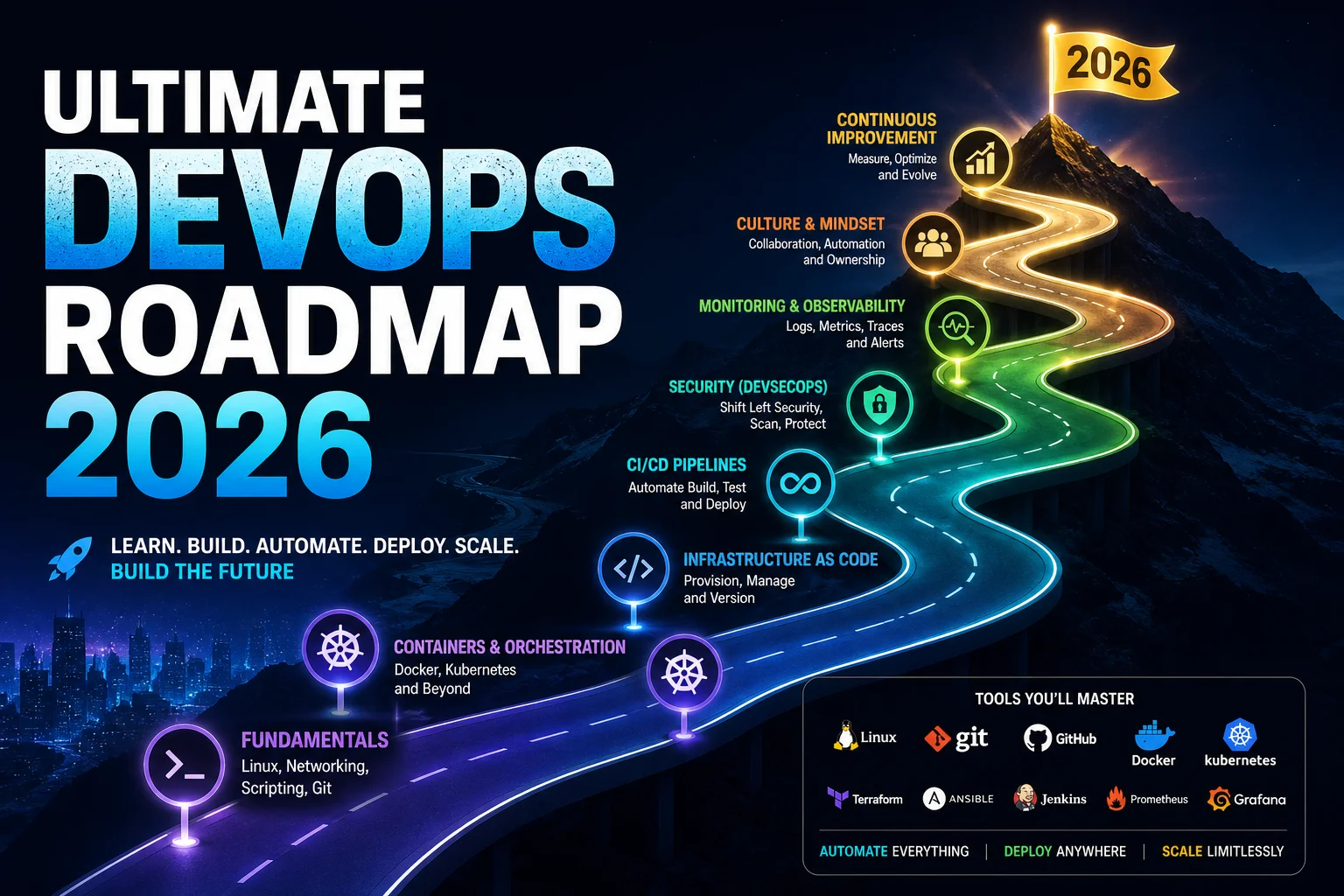
The roadmap below is organized into three phases that match how real DevOps skills compound. Don’t skip phases. The engineers who struggle most are usually the ones who jumped into Kubernetes before they understood Linux or networking. Foundation first — everything else builds on it.
📌 The Core Principle
Learn the concept → Understand why it exists → Practice the tool that implements it → Build something real with it. Repeat. Tools change every few years. Mental models last a career.
🟢 Phase 1 – Beginner Level (0–2 Months)
Phase 1 is about building the foundation that every DevOps tool assumes you already have. Skipping this phase is the single most common reason people plateau at junior level and can’t debug their way out of problems.
Learn Linux Fundamentals
Almost every server in the world runs Linux. Kubernetes nodes run Linux. Docker containers run Linux. AWS EC2 instances run Linux. You don’t need to be a Linux sysadmin, but you need to be completely comfortable in a terminal.
What to learn: File system structure and navigation (ls, cd, pwd, find). File permissions and ownership (chmod, chown). Process management (ps, top, kill, systemctl). Package management (apt, yum). Shell scripting basics (variables, loops, conditionals, functions). Text processing (grep, awk, sed, cut). SSH and key-based authentication. Cron jobs for scheduling. Understanding stdin, stdout, stderr, and piping.
Time estimate: 3–4 weeks of daily practice. The best way to learn Linux is to use it — spin up a free Ubuntu VM on any cloud provider and do everything from the terminal.
Networking Basics
When a container can’t reach a database, or a load balancer isn’t routing traffic correctly, or a Kubernetes service isn’t exposing your pod — networking knowledge is what lets you diagnose and fix it. Without this foundation, you’re guessing.
What to learn: IP addressing and subnetting (CIDR notation — know what /24 and /16 mean). DNS — how domain names resolve to IPs, what A records and CNAME records are. TCP/IP and the OSI model at a conceptual level. HTTP/HTTPS — request/response cycle, status codes, headers. Firewalls and ports — what a port is, what “port 80” means, how firewall rules work. Load balancing concepts. VPNs and what they actually do. Tools: ping, traceroute, nslookup, curl, netstat, ss.
Git & GitHub
Git is non-negotiable. Everything in DevOps — application code, infrastructure code, CI/CD pipelines, Kubernetes configs — lives in a Git repository. GitOps (managing infrastructure state through Git) is the dominant paradigm in 2026.
What to learn: Core concepts (repository, commit, branch, merge, rebase). Working with remotes (clone, fetch, pull, push). Branching strategies (GitFlow, trunk-based development). Pull requests and code review workflows. Resolving merge conflicts. Git hooks. Understanding .gitignore. GitHub Actions basics (you’ll go deeper in Phase 2). Tagging and semantic versioning.
💡 Phase 1 Milestone
You’re ready for Phase 2 when you can: SSH into a server, navigate the filesystem, write a basic shell script, set up a Git repo, make branches, and merge pull requests — all without Googling basic syntax.
🟡 Phase 2 – Intermediate Level (2–6 Months)
Phase 2 is where DevOps starts to feel real. These are the skills that appear in almost every DevOps job description and that hiring managers specifically test for.
Docker (Containerization)
Docker is the entry point to the modern infrastructure world. Understanding containers — what they are, why they exist, and how to build and run them — is a prerequisite for almost everything else in Phase 2 and Phase 3.
What to learn: Images vs containers vs Dockerfiles. Writing optimized, multi-stage Dockerfiles. Running and managing containers. Docker networking and volumes. Docker Compose for multi-service local development. Pushing/pulling images from registries. Container security fundamentals. Image size optimization.
Why it matters: Docker isn’t just a development tool anymore — it’s the packaging standard for cloud-native applications. Kubernetes, the dominant orchestration platform, runs Docker-compatible containers. You cannot work meaningfully in Kubernetes without strong Docker foundations.
CI/CD Pipelines
CI/CD (Continuous Integration / Continuous Delivery) is arguably the core skill of DevOps. Building pipelines that automatically test, build, and deploy code is what distinguishes a DevOps engineer from a person who just runs docker run.
What to learn: The conceptual difference between CI and CD. Writing pipeline definitions (YAML-based for GitHub Actions and GitLab CI). Build triggers (push, PR, tag, schedule). Pipeline stages: lint → test → build → security scan → deploy. Artifact management. Secrets management in pipelines. Environment promotion (dev → staging → prod). Rollback strategies. Start with GitHub Actions — it’s the most accessible and widely used.
Cloud Basics (AWS / Azure / GCP)
Pick one cloud provider and go deep before touching the others. AWS has the largest market share and job demand, making it the most pragmatic first choice for most people. Azure is dominant in enterprise Microsoft environments. GCP has a strong foothold in AI/ML workloads.
Core AWS concepts to learn: IAM (Identity & Access Management) — users, roles, policies, least privilege. EC2 — virtual machines, AMIs, security groups, key pairs. S3 — object storage, bucket policies, versioning. VPC — virtual networks, subnets, routing tables, NAT gateways. RDS — managed databases. ECS and EKS — container services. CloudWatch — monitoring and logging. Route 53 — DNS. Load Balancers (ALB, NLB). Auto Scaling groups.
Certification path: AWS Certified Cloud Practitioner is a good first certification for cloud fundamentals. AWS Solutions Architect Associate is the milestone that significantly impacts your hiring prospects and salary.
💡 Phase 2 Milestone
You’re ready for Phase 3 when you can: Containerize an application, build a working CI/CD pipeline that deploys to the cloud on every merge, and deploy infrastructure using the cloud provider’s console or CLI. At this point, you’re hireable as a junior DevOps engineer.
🔴 Phase 3 – Advanced Level (6–12 Months)
Phase 3 separates mid-level from senior DevOps engineers. These are the skills that command the highest salaries, require genuine depth, and take real production experience to master properly.
Kubernetes
Kubernetes is the operating system of the cloud-native world. It’s complex, opinionated, and powerful — and it’s the most in-demand skill in the DevOps job market in 2026. Understanding Kubernetes deeply is what gets you to senior engineer compensation.
What to learn: Core objects (Pods, Deployments, Services, ConfigMaps, Secrets, Namespaces). Networking (Ingress, NetworkPolicy, service discovery, DNS). Storage (PersistentVolumes, PersistentVolumeClaims, StorageClasses). Scaling (HPA, VPA, Cluster Autoscaler). RBAC and security. Helm for package management. Operators for complex stateful workloads. Service meshes (Istio, Linkerd) at a conceptual level. GitOps with ArgoCD or Flux.
Certification: CKA (Certified Kubernetes Administrator) is the most respected Kubernetes certification. It’s exam-day practical — you solve real problems in a live cluster — which makes it genuinely meaningful on a resume. CKAD is for developers who work with Kubernetes. CKS (security) is the advanced track.
Terraform (Infrastructure as Code)
Terraform is the industry standard for Infrastructure as Code (IaC). Instead of clicking around cloud consoles (which creates snowflake infrastructure nobody can reproduce), you write HCL code that declaratively describes your entire infrastructure. Terraform applies it, tracks state, and handles updates and deletions safely.
What to learn: HCL syntax and Terraform fundamentals (providers, resources, data sources, outputs, variables). State management (remote state with S3 + DynamoDB lock, Terraform Cloud). Modules for reusable infrastructure. Workspaces for environment separation. terraform plan as a safety net. Importing existing infrastructure. Drift detection. Terragrunt for managing complex multi-account setups. The Terraform Associate certification is widely recognized and worth pursuing.
Monitoring (Prometheus + Grafana)
You can’t operate what you can’t observe. Monitoring, logging, and alerting are what turn “I think something is wrong” into “service X has a 400ms latency spike because the database connection pool is exhausted.” Prometheus + Grafana is the dominant open-source observability stack in 2026.
What to learn: The three pillars of observability (metrics, logs, traces). Prometheus data model (time-series, labels, metric types). PromQL query language. Writing alerting rules. Grafana dashboards — building them from scratch, not just importing community dashboards. Log aggregation with the ELK stack (Elasticsearch, Logstash, Kibana) or Loki. Distributed tracing concepts (OpenTelemetry, Jaeger). SLOs, SLIs, and SLAs — the reliability engineering vocabulary that separates senior engineers from everyone else.
🧰 DevOps Tools List 2026 (Category-Wise)

One of the biggest sources of confusion for DevOps learners is the sheer number of tools. Here’s the definitive 2026 category-wise breakdown — with a clear distinction between what’s essential and what’s situational.
Version Control
Git is the underlying version control system — the non-negotiable foundation. GitHub is the dominant platform for hosting repositories, managing pull requests, and running CI/CD via GitHub Actions. It’s where most open-source projects live and where most portfolio work should be visible. GitLab is a strong alternative with built-in CI/CD that’s widely used in enterprise environments, particularly for organizations that self-host. Bitbucket remains common in companies already invested in the Atlassian (Jira) ecosystem.
Containerization
Docker remains the standard container runtime and build tool — the Dockerfile format and the Docker image specification are the universal language of containerization. Podman has gained traction as a rootless, daemonless alternative in security-conscious environments. Buildah and Kaniko are used for building images in CI environments where a Docker daemon isn’t available (like inside Kubernetes). For production container runtime, containerd is what Kubernetes actually uses under the hood — and it’s worth understanding even if you rarely interact with it directly.
Orchestration
Kubernetes is the clear winner of the container orchestration wars. It runs in every major cloud (EKS on AWS, AKS on Azure, GKE on GCP) and on bare metal. The managed Kubernetes offerings have dramatically reduced operational overhead since the early days. Helm is the Kubernetes package manager — it’s not optional; you’ll use it constantly. ArgoCD and Flux are GitOps controllers that synchronize Kubernetes cluster state with Git repositories. Docker Swarm exists but is effectively legacy at this point.
CI/CD
GitHub Actions is the most accessible and widely used CI/CD tool in 2026 — if you’re starting fresh, start here. GitLab CI is deeply integrated with GitLab repositories and is the go-to for self-hosted pipelines. Jenkins is the veteran of the space — it has an enormous plugin ecosystem and is still dominant in older enterprise environments, but its configuration complexity has caused many teams to migrate away. CircleCI, Buildkite, and Tekton are all worth knowing at a conceptual level. For deployment specifically, Spinnaker and ArgoCD handle the CD side for complex multi-environment setups.
Cloud Providers
AWS (Amazon Web Services) holds approximately 33% of the cloud market and has the highest number of job listings. If you can only learn one cloud deeply, AWS is the pragmatic choice. Azure is second at around 22% market share and dominates in enterprise Microsoft shops. GCP (Google Cloud Platform) is strong in AI/ML workloads and data engineering. Most organizations run multi-cloud or hybrid setups, so architectural breadth matters more at senior levels — but go deep on one provider first.
Infrastructure as Code
Terraform by HashiCorp is the industry standard IaC tool — provider-agnostic, widely adopted, and the subject of the most job requirements. Pulumi allows you to write infrastructure code in TypeScript, Python, Go, or C# rather than HCL — gaining traction with developer-centric teams. AWS CloudFormation and Azure Resource Manager (ARM) templates are cloud-native IaC that matter when you’re deep in a single cloud ecosystem. Ansible bridges the gap between IaC and configuration management — excellent for provisioning and configuring servers after they’ve been created.
Monitoring & Logging
Prometheus is the de-facto standard for metrics collection in cloud-native environments — it integrates natively with Kubernetes and has an enormous ecosystem of exporters. Grafana is the visualization layer — it connects to Prometheus (and dozens of other data sources) and is where you build operational dashboards. ELK Stack (Elasticsearch, Logstash, Kibana) is the most widely deployed log aggregation solution. Loki (by Grafana Labs) is a lightweight alternative for logs that pairs naturally with a Prometheus + Grafana stack. Datadog and New Relic are the leading commercial observability platforms — you’ll encounter them in most enterprise environments. OpenTelemetry is the emerging standard for distributed tracing instrumentation.
💻 DevOps Projects for Hands-On Learning
Reading about DevOps is not learning DevOps. The only way to actually learn this stuff is to build things, break things, debug things, and build them again. Here are the projects that actually move the needle — structured by level, with enough detail to actually execute them.
Beginner Projects
Project: Deploy a Static Website Using Docker
Write a simple HTML/CSS website. Write a Dockerfile that uses the official Nginx image as a base. Copy your website files into the Nginx default serving directory. Build the image. Run a container from it. Access the website in your browser via localhost. Push the image to Docker Hub with a public tag. Then write a docker-compose.yml that defines the service, port mapping, and restart policy.
What you’ll learn: Dockerfile authoring, image building, container networking (port mapping), Docker Hub, and Docker Compose basics. This project teaches all the core Docker concepts in a self-contained, completable format that you can actually show someone.
Extend it: Add a second container — a reverse proxy like Traefik or Nginx — and route traffic through it. This introduces multi-container networking via docker-compose, which is a huge learning jump.
Intermediate Projects
Project: Full CI/CD Pipeline with GitHub Actions
Take any simple web application (Node.js, Python Flask, whatever you’re comfortable with). Set up a GitHub repository. Write a GitHub Actions workflow that triggers on every push to the main branch and does the following: runs linting, runs unit tests, builds a Docker image, pushes it to Docker Hub or GitHub Container Registry (GHCR), and deploys it to an AWS EC2 instance (or any VPS) via SSH.
What you’ll learn: The full CI/CD feedback loop, GitHub Actions workflow YAML syntax, secrets management in CI, Docker registry integration, SSH-based deployment, and environment variables. This project is the most commonly asked-about type in DevOps technical interviews.
Extend it: Add separate environments (staging and production). Deploy to staging automatically on every merge, but require a manual approval before promoting to production. Add a Slack notification when the pipeline succeeds or fails.
Advanced Projects
Project: Kubernetes Deployment + Monitoring Setup
This is the capstone project. Provision a Kubernetes cluster using Terraform (either a managed cluster like EKS/GKE, or a local one with Kind/k3d for cost savings). Deploy a multi-service application using Kubernetes manifests or a Helm chart — at minimum an application server, a database (use a StatefulSet), and a reverse proxy. Set up Prometheus and Grafana using the kube-prometheus-stack Helm chart. Create a custom Grafana dashboard that shows request rate, error rate, and p99 latency for your application. Configure alerting rules in Prometheus that fire if error rate exceeds 1% for more than 5 minutes.
What you’ll learn: Kubernetes object types in real use, Helm chart deployment, StatefulSets for databases, PVCs for persistent storage, RBAC for service accounts, Prometheus scrape configuration, PromQL queries, and Grafana dashboard creation. This project alone, documented well on GitHub, is stronger than most certifications in a portfolio context.
Extend it: Add a GitOps layer using ArgoCD. Store all Kubernetes manifests in a Git repository and have ArgoCD synchronize the cluster state automatically. Add an Ingress controller and expose your application on a real domain with HTTPS using cert-manager and Let’s Encrypt.
💰 DevOps Salary in 2026 (India + Remote Jobs)
DevOps compensation has continued to rise in 2026. Here’s a realistic picture — based on current job market data — broken down by level and geography.
Entry-Level Salary
Entry-level DevOps engineers (0–2 years of experience) typically have Phase 1 and Phase 2 skills: Linux, Git, Docker, basic CI/CD, and at least one cloud provider. In India, entry-level DevOps roles at product companies and startups pay between ₹6–14 LPA, with service companies ranging from ₹5–9 LPA. In the US, entry-level roles (often titled “Junior DevOps Engineer” or “Cloud Support Engineer”) range from $70,000–$100,000 annually. Remote-first companies, even if India-headquartered, often pay 40–60% premium over local market rates for strong candidates.
Mid-Level Salary
Mid-level engineers (2–5 years) with strong Docker, Kubernetes, CI/CD, and cloud skills are among the most in-demand professionals in the current market. In India at product companies: ₹15–30 LPA. MNCs and unicorn startups often go higher. In the US: $110,000–$155,000. Remote roles for US-based companies hiring globally: $60,000–$100,000, depending on the company and candidate strength. At this level, a CKA certification and AWS Solutions Architect certification together can push compensation significantly above the median.
Senior DevOps Engineer Salary
Senior engineers (5+ years) who own architecture decisions, build platform teams, and have deep expertise in at least two of the Phase 3 domains are genuinely hard to hire. In India’s top product companies: ₹35–70+ LPA. In the US: $160,000–$220,000+. Staff and Principal DevOps/Platform engineers at FAANG-adjacent companies: $250,000+ total compensation when equity is included.
Salary by Skills
| Skill/Certification | India Premium | US Market Premium |
|---|---|---|
| Kubernetes (CKA) | +15–25% | +$15,000–$25,000/yr |
| AWS (Solutions Architect) | +10–20% | +$10,000–$20,000/yr |
| Terraform (Associate) | +8–15% | +$8,000–$15,000/yr |
| Security (DevSecOps) | +20–35% | +$20,000–$40,000/yr |
| Platform Engineering | +25–40% | +$25,000–$50,000/yr |
Remote Job Opportunities
The remote DevOps job market from India has matured significantly. Platforms like Toptal, Turing, Deel, and Remote.com connect Indian DevOps engineers with US and EU companies at globally competitive rates. The realistic earning potential for a strong mid-level DevOps engineer with good English communication skills, a solid GitHub portfolio, and relevant certifications is $4,000–$8,000/month remote — representing 4–6x the local market rate. This arbitrage window remains open in 2026, though it’s getting more competitive as more engineers pursue this path.
⚔️ DevOps vs SRE vs Cloud Engineer
These three roles are often confused — and sometimes the same person does all three, depending on the company. Here’s how to think about them clearly.
Key Differences
| Dimension | DevOps Engineer | SRE (Site Reliability Engineer) | Cloud Engineer |
|---|---|---|---|
| Core Focus | Automation, CI/CD, developer productivity | Reliability, SLOs, reducing toil | Cloud infrastructure design & management |
| Background | Dev or Ops with automation mindset | Strong software engineer in ops role | Infrastructure/networking background |
| Coding | Moderate (scripts, pipelines, IaC) | Heavy (writes production software) | Light to moderate |
| Metrics | Deployment frequency, lead time | SLI/SLO/SLA, error budget, MTTR | Cost optimization, uptime, performance |
| Originated at | Agile software teams | Google (2003) | Cloud provider ecosystems |
Which Career Path Should You Choose?
Choose DevOps if you want to work close to the full engineering lifecycle — from code to production — and enjoy building the systems that make other developers more productive. It’s the most common entry point and the most broadly applicable skill set.
Choose SRE if you’re a strong programmer who enjoys systems thinking, reliability challenges, and wants to work at companies (Google, Netflix, Stripe, Cloudflare) where SRE is a distinct, deeply technical discipline. SRE roles typically pay more than DevOps at the senior level but are harder to enter without strong software engineering foundations.
Choose Cloud Engineer if you enjoy infrastructure architecture — designing VPC networks, planning multi-region setups, optimizing cloud costs, and working deeply within a single cloud provider’s ecosystem. The cloud certifications (AWS SA Pro, Google Professional Cloud Architect) are the clearest signal for this path.
⏳ DevOps Learning Timeline (Realistic Plan)
3-Month Fast-Track Plan
This plan is for people who can dedicate 4–6 hours daily (bootcamp-style intensity). It’s aggressive but achievable. Month 1: Linux deeply (2 weeks), Networking basics (1 week), Git + GitHub (1 week). Month 2: Docker completely (2 weeks), GitHub Actions CI/CD pipeline (1 week), AWS fundamentals + Cloud Practitioner exam (1 week). Month 3: Kubernetes core concepts (2 weeks), First capstone project (1 week), Job application prep — LinkedIn, GitHub portfolio, resume (1 week).
At 3 months, you’re qualified for junior DevOps positions and cloud support roles. Set realistic expectations — senior roles require actual experience, not just knowledge. But the market for well-prepared juniors is genuinely good right now.
6-Month Job-Ready Plan
This plan is for people with 2–3 hours per day — evenings and weekends while working a current job. Months 1–2: Phase 1 completely (Linux, Networking, Git). Months 3–4: Docker, GitHub Actions CI/CD, AWS basics + Cloud Practitioner certification. Month 5: Kubernetes fundamentals, Terraform introduction, build the intermediate project. Month 6: CKA exam prep, advanced project, portfolio and job applications. At 6 months, you’re competitive for junior-to-mid roles with the right portfolio to prove your skills.
12-Month Mastery Plan
This is the full-depth path for career changers or those who want to enter at mid-level rather than junior. Months 1–3: Complete Phase 1 + Phase 2, earn AWS Cloud Practitioner, build 2 beginner projects. Months 4–6: Kubernetes deeply, Terraform, earn AWS Solutions Architect Associate, build intermediate project. Months 7–9: Advanced monitoring (Prometheus/Grafana), security fundamentals, GitOps with ArgoCD, earn CKA. Months 10–12: Capstone project (full K8s + monitoring + GitOps), Terraform Associate certification, open-source contributions, job search. At 12 months, you’re positioned for mid-level DevOps or cloud engineer roles at competitive compensation.
❌ Common Mistakes to Avoid in DevOps Learning
Learning Too Many Tools
The DevOps ecosystem has hundreds of tools. The temptation — especially when you look at a job description that lists fifteen technologies — is to try to learn all of them simultaneously. This is the fastest path to burnout and shallow knowledge. Hiring managers don’t want someone who has watched a YouTube overview of every tool. They want someone who has gone deep on five or six things and can prove it with real work.
The rule: learn one tool per category to genuine proficiency before moving on. One container tool (Docker), one orchestrator (Kubernetes), one CI/CD platform (GitHub Actions), one cloud (AWS), one IaC tool (Terraform). Go wide only after you’ve gone deep.
Skipping Fundamentals
The number one complaint I hear from DevOps hiring managers is that candidates can run Kubernetes commands they found in a tutorial but can’t explain why a pod is stuck in Pending state, or why two containers on different networks can’t communicate. That gap is always Linux and networking fundamentals.
Tools change. Mental models don’t. Understanding how processes, file descriptors, network namespaces, and DNS actually work makes every tool intuitive — even ones you’ve never used before. Skipping to the “cool” stuff early means building on sand. Spend the time on fundamentals. You’ll recover it tenfold later.
Not Building Projects
Course completion certificates are not the same as skills. You can watch every Docker tutorial on YouTube and still be unable to debug why your container exits with code 137. Projects are where learning actually happens — because projects generate real errors, real edge cases, and real problem-solving experience that tutorials never expose you to.
A rule that works: for every hour of tutorial you watch, spend two hours building something with what you just learned. And every project you complete should live on GitHub with a proper README — because that GitHub profile is your actual resume when you apply for DevOps roles.
📚 Best Resources to Learn DevOps
Free Resources
Linux Journey (linuxjourney.com) — the best free interactive Linux fundamentals course available. The Missing Semester of Your CS Education (missing.csail.mit.edu) — MIT’s course on the practical tools (shell, vim, git, debugging) that CS programs skip. Play with Docker (labs.play-with-docker.com) — browser-based Docker labs with no setup. Kubernetes Documentation (kubernetes.io/docs) — the official docs have become excellent and include interactive tutorials. AWS Free Tier — create an AWS account and use it; hands-on practice beats any tutorial. GitHub Learning Lab — structured interactive courses directly in GitHub for Actions, Git, and more. DevOps Roadmap (roadmap.sh/devops) — a visual, community-maintained roadmap that complements this guide.
Paid Courses
Mumshad Mannambeth’s courses on KodeKloud — the gold standard for DevOps course content. His CKA, CKAD, Docker, and Terraform courses are each exceptional. KodeKloud’s built-in labs let you practice in real environments. Bret Fisher’s Docker Mastery on Udemy — consistently the most recommended Docker course. Well-maintained and practical. A Cloud Guru / Pluralsight — particularly strong for AWS and multi-cloud content. Adrian Cantrill’s AWS courses (learn.cantrill.io) — extremely deep, architectural AWS content that prepares you for both the certification and real-world work simultaneously.
YouTube Channels
TechWorld with Nana — the best DevOps YouTube channel for structured, well-produced tutorials on Docker, Kubernetes, CI/CD, and Terraform. NetworkChuck — excellent for Linux and networking fundamentals with an engaging teaching style. Fireship — fast, technically sharp overviews of tools and concepts (great for quick orientation before going deep). KodeKloud — their free YouTube content mirrors the quality of their paid courses. Kunal Kushwaha — strong DevOps and Kubernetes content specifically aimed at Indian learners entering the field.
Documentation
Official documentation should be your primary reference once you have context from a course. The docs that are genuinely excellent and worth reading directly: Kubernetes Docs (kubernetes.io), Terraform Registry (registry.terraform.io), Docker Docs (docs.docker.com), AWS Documentation (docs.aws.amazon.com — overwhelming in breadth, but individual service docs are good), GitHub Actions Docs (docs.github.com/en/actions). For interviewing, the DORA State of DevOps Report (published annually by Google Cloud) is essential reading — it’s the research that defines the metrics the industry uses.
🔗 Related Roadmaps (Go Deeper)
This DevOps Roadmap 2026 is part of a series. Each tool listed here has its own in-depth guide — use these as the next step once you’re ready to specialize.
Docker Roadmap 2026
Everything from writing your first Dockerfile to multi-stage builds, container security, Docker Compose for production, and image optimization strategies. The complete Docker learning path from zero to deployment-ready. → Read the Docker Cheatsheet & Roadmap
Kubernetes Roadmap 2026
The full Kubernetes learning path — from Pods and Deployments to Operators, Service Meshes, and the CKA exam. Including kubectl cheatsheet, YAML templates, and real-world debugging scenarios. → Read the Kubernetes Cheatsheet & Roadmap
Terraform Roadmap 2026
From HCL basics to advanced module design, remote state management, multi-account AWS setups, and the Terraform Associate certification guide. Learn to manage infrastructure at scale. → Read the Terraform Roadmap (coming soon)
CI/CD Roadmap 2026
Deep-dive into pipeline design patterns, GitHub Actions advanced features, Jenkins pipelines, security scanning integration, and deployment strategies (blue-green, canary, rolling). → Read the CI/CD Roadmap (coming soon)
❓ FAQs (Frequently Asked Questions)
How long does it take to learn DevOps?
With consistent daily practice (2–3 hours), most people reach a junior-hireable level in 4–6 months. A mid-level skill set with certifications and a strong project portfolio realistically takes 9–12 months. Senior-level competency requires 2–4 years of actual production experience — there are no shortcuts there. The speed of learning depends less on raw intelligence and more on consistency, the quality of hands-on practice, and whether you build real projects vs. just watch tutorials.
Is DevOps hard for beginners?
DevOps has a steep initial learning curve, but it’s not inaccessible. The challenge is that it requires breadth across multiple domains (Linux, networking, scripting, cloud, containers, CI/CD) rather than deep expertise in one language. The key is following a structured path — learning fundamentals first — rather than jumping into complex tools. Most people who say “DevOps is too hard” were following the wrong learning order. With the right sequence, each concept builds naturally on the previous one.
Can I learn DevOps without coding?
You can get into entry-level DevOps roles with minimal coding ability — shell scripting, YAML for pipeline definitions, and HCL for Terraform will get you far. However, as you progress toward senior levels, scripting in Python or Go becomes increasingly important. You won’t be writing application logic, but you will write automation scripts, custom tooling, Lambda functions, and Kubernetes operators. “No coding” DevOps is a junior position ceiling; some scripting ability removes that ceiling. Start with Bash — it’s unavoidable and not as hard as people fear.
Which cloud is best for DevOps?
AWS is the most pragmatic first choice for DevOps in 2026 — it has the largest market share, the most job listings, the deepest ecosystem of services, and the most community learning resources. If you’re targeting enterprise Microsoft environments, add Azure. If you’re interested in AI/ML infrastructure or data engineering pipelines, GCP has distinct advantages. The conceptual skills you learn in one cloud transfer meaningfully to the others — so go deep on AWS first, then add breadth later.
🎯 Conclusion
Final Thoughts
DevOps in 2026 is not a trend that’s about to peak — it’s infrastructure. Every software company in the world needs people who can build reliable, automated, observable systems. The demand is structural, the supply gap is real, and the compensation reflects both of those facts.
The roadmap in this guide works. It’s not the fastest path to every possible DevOps job, but it’s the most reliable path to becoming a DevOps engineer who genuinely understands what they’re doing — which is the only kind that grows past junior level and commands the salaries that make this career worth pursuing.
The single most important thing you can do today, after reading this guide, is pick your starting point and open a terminal. Not another article. Not another YouTube video. A terminal. Install Ubuntu on a VM, SSH into it, and start navigating. Learning by doing is not a cliché in DevOps — it’s the only method that actually works.
Come back to this guide whenever you need to check where you are on the path. The tools will change over the years — new ones will emerge, old ones will fade — but the mental model of what DevOps is trying to accomplish stays constant. Build that model deeply, and the tools will always be learnable.
📢 Call to Action
Ready to start your DevOps journey?
Here’s what to do next — pick one, do it now, and build momentum:
- ⭐ Bookmark this page — come back as your reference for each phase
- 📥 Download the Docker & Kubernetes Cheatsheets — use them daily while learning
- 🐙 Create a GitHub account if you don’t have one — that profile is your DevOps resume
- 🔔 Subscribe / Follow for new roadmaps, tool guides, and career content
- 💬 Drop a comment below — tell us which phase you’re starting from. We read and respond to every one.
Share this roadmap with someone who told you they want to learn DevOps — the best gift you can give them is a structured starting point.
About the Author
Senior DevOps Engineer & Technical Educator
With over 7 years of experience designing and operating cloud-native infrastructure at scale — across product startups, unicorns, and enterprise environments. I write to make the path into DevOps clearer and less overwhelming for the next generation of engineers.